Imagine you've just upgraded your front door and you're scrolling through Amazon reviews at midnight, reading contradictory opinions about latency, hub requirements, and whether a particular lock "plays nice" with the Home app. You know you want Apple HomeKit compatibility, you probably want Apple Home Key, and you definitely don't want to spend two hours troubleshooting a bridge device on a weeknight. The problem isn't a lack of options — it's that nearly every lock on the shelf claims to be the best one for iPhone users.
In 2026, the HomeKit ecosystem has expanded well beyond the handful of early adopters that launched the category. You now have everything from invisible retrofit locks that hide entirely inside your door to Thread-enabled deadbolts that communicate with your Apple home hub without a separate bridge. Smart locks built for Apple's ecosystem benefit from on-device processing, which means your unlock history and access codes never leave Apple's encrypted infrastructure — a meaningful privacy advantage over proprietary cloud-dependent alternatives, as detailed in the Apple HomeKit Wikipedia overview.

This guide reviews seven of the strongest HomeKit-compatible deadbolts available in 2026, ranging from the nearly invisible Level Lock+ to the fingerprint-and-keypad powerhouse from ULTRALOQ. We've broken down each lock's connectivity method, access management depth, installation complexity, and real-world integration quality so you can match the right hardware to your specific door, lifestyle, and Apple setup.
Contents
Top Rated Picks of 2026
- #PreviewProductRating
- Bestseller No. 1
 Rating:

- Bestseller No. 2
 Rating:
 - Bestseller No. 3
 Rating:
 - Bestseller No. 4
 Rating:
 - Bestseller No. 5
 Rating:
 - Bestseller No. 6
 Rating:
 - Bestseller No. 7
 Rating:

Our Hands-On Reviews
1. Schlage Encode Plus Smart Wi-Fi Lock — Best for Built-in WiFi with Apple Home Key
The Schlage Encode Plus earns its spot at the top of most HomeKit lists in 2026 by solving the hub problem entirely — built-in WiFi means there's no bridge to buy, configure, or lose power before you can control the lock remotely. You connect it directly to your 2.4 GHz home network, pair it with the Schlage Home app, and within minutes you have full remote access, push notifications, and up to 100 access codes ready to assign. The integration with Apple HomeKit and Apple Home Key is genuinely seamless, letting you tap your iPhone or Apple Watch against the lock without opening an app or entering a PIN.
Build quality is where Schlage has historically outpaced the competition, and the Encode Plus continues that tradition with a solid deadbolt mechanism that meets ANSI Grade 1 standards — the highest residential security rating available. The matte black finish holds up well against fingerprints and daily wear, and the keypad is backlit and responsive even in direct sunlight. Lock history, customizable notifications, and multi-lock management through the Schlage Home app round out a feature set that covers most households without requiring additional accessories.
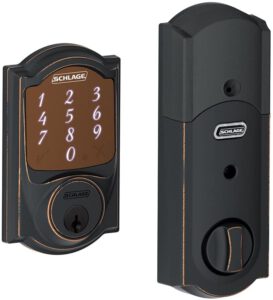
Where the Encode Plus asks for some patience is in the initial setup process, which can run 20–30 minutes if your WiFi signal near the door is marginal. The lock is also bulkier than some competitors on the interior side, which is worth checking against your door frame clearance before ordering. That said, for households deeply embedded in the Apple ecosystem that want a reliable, hub-free experience, the Encode Plus is one of the most complete packages available at this price point.
Pros:
- Built-in WiFi — no hub or bridge required for remote access
- Full Apple Home Key support for tap-to-unlock via iPhone or Apple Watch
- ANSI Grade 1 security rating — highest residential deadbolt standard
- Manages up to 100 access codes with customizable notifications
- Lock and unlock from anywhere via the Schlage Home app
Cons:
- Larger interior footprint than retrofit-style competitors
- Setup can be slow if your door-side WiFi signal is weak
- Premium price point compared to Bluetooth-only alternatives

2. Level Lock+ WiFi Deadbolt — Best for Invisible, Discreet Design
The Level Lock+ solves a problem most smart lock buyers don't realize they have until they're standing in front of their door: the technology sits entirely inside the deadbolt cylinder itself, leaving your door looking completely unchanged from both the inside and the outside. There's no keypad bolted to the exterior, no bulky motor housing on the interior, and no obvious indication to anyone passing by that the lock is anything other than a standard deadbolt. For renters who need landlord approval, homeowners in HOA-managed communities, or anyone who simply values aesthetic minimalism, this is a genuinely unique proposition in the HomeKit market.
The included Level Connect Wi-Fi bridge plugs into a nearby outlet and provides remote access, live activity history, and the ability to manage key codes for the Level Keypad (sold separately) from anywhere via the Level Home app. Apple Home Key works exactly as you'd expect — tap your iPhone or Apple Watch, and the deadbolt turns, even when your device is powered off. Connectivity runs on 2.4 GHz WiFi, and the app covers both iOS and Android for households with mixed-device families.
The trade-off is that Level's ecosystem asks more of you in terms of accessories. The base Lock+ needs the Wi-Fi bridge for remote access, and if you want a physical keypad, that's an additional purchase. Battery life is also more limited than full-size competitors due to the compact cylinder design, so expect to replace AA batteries every few months under regular use. If you can work within those constraints, the Level Lock+ delivers the most refined HomeKit installation experience available in 2026.
Pros:
- Completely invisible — no exterior or interior hardware changes to your door
- Apple Home Key support for tap-to-unlock via iPhone or Apple Watch
- Works with Apple Home, Alexa, and Google Home
- Available in multiple sophisticated finishes to match existing hardware
- Wi-Fi bridge included for remote access out of the box
Cons:
- No keypad included — must purchase Level Keypad separately for code entry
- Battery life shorter than full-size deadbolt competitors
- Bridge must remain plugged in for remote functionality
3. ThorBolt X1 Apple Home Key Lock — Best for Thread Protocol and Future-Proofing
The ThorBolt X1 is the most forward-looking lock in this roundup, built specifically for Apple users who want to stay on the cutting edge of smart home connectivity. Thread support means the X1 communicates directly with your Apple home hub — an Apple TV 4K or HomePod — using an ultra-reliable, low-latency mesh protocol that doesn't depend on your 2.4 GHz WiFi channel being clear or your router being responsive. The result is genuinely fast response times and a lock that stays controllable even when other smart home devices are struggling with network congestion. Note that a Thread-enabled Apple home hub within 33 feet of the X1 is required for remote access.
Physical access options are comprehensive: the dedicated NFC sensing zone supports Apple Home Key for tap-to-unlock with an iPhone or Apple Watch — even when the device is out of power — and the lock also includes a fingerprint reader and anti-peep keypad for up to 100 passcodes and 100 fingerprints across 50 users. IP65 weatherproofing makes it genuinely suitable for exposed exterior doors, and the Sleekpoint app handles access management, auto-lock configuration, power saving settings, and ongoing firmware updates. This is an iOS-only product, which the manufacturer is transparent about upfront.
The X1's main constraint is the Thread hub requirement, which adds friction for anyone who doesn't already own an Apple TV 4K or recent HomePod. If you're building a HomeKit home from scratch and you're planning to invest in that hub anyway, the X1 makes excellent long-term sense. If you need something that works independently over WiFi without additional Apple hardware, the Schlage Encode Plus or Yale Assure Lock 2 are more straightforward choices.
Pros:
- Thread support delivers ultra-reliable, low-latency communication with Apple home hub
- Apple Home Key works even when iPhone or Apple Watch is out of power
- Fingerprint reader supports up to 100 fingerprints across 50 users
- IP65 weatherproof rating for exposed exterior doors
- Ongoing firmware updates ensure long-term performance improvement
Cons:
- iOS-only ecosystem — no Android support whatsoever
- Requires Thread-enabled Apple home hub within 33 feet for remote access
- Relatively new brand with a shorter track record than Schlage or Yale
4. Aqara Smart Lock U100 — Best for Multi-Platform Smart Home Integration
If your household runs a mixed smart home — some Apple devices, some Google, maybe an Alexa speaker in the kitchen — the Aqara U100 is the lock that bridges all of those worlds without forcing you to pick sides. It offers full Apple Home integration with Home Key support, and when paired with an Aqara Zigbee 3.0 hub, it extends compatibility to Google Home, Alexa, and IFTTT automations simultaneously. That's a flexibility level that most HomeKit locks simply don't offer, and it future-proofs your investment if your household's ecosystem preferences shift over time.

Physical access is handled through a high-precision fingerprint reader that stores up to 50 fingerprints, remotely configurable passwords via the Aqara Home app, one-time local passwords for visitors, and a mechanical key for emergencies. The Apple Home Key works even when your iPhone or Apple Watch is powered off, which is a genuine safety feature rather than a marketing talking point. IP65 weatherproofing means you can install this on doors exposed to rain, humidity, and temperature swings without concern about premature failure. Managing guest access codes and temporary visitor passwords — something especially useful for Airbnb hosts or frequent visitors — is handled cleanly through the app interface.
The caveat worth knowing before you order: remote access and third-party ecosystem integration require an Aqara Zigbee 3.0 hub, which is sold separately. If you already own Aqara hub hardware, this is a straightforward add-on. If you're starting from zero, factor in the hub cost alongside the lock price. NFC cards are also sold separately if you want that access option. Within those constraints, the U100 delivers one of the most versatile HomeKit lock experiences available in 2026 at a competitive price point.
Pros:
- Apple Home Key, Google Home, Alexa, and IFTTT all supported in one device
- High-precision fingerprint reader for up to 50 fingerprints
- One-time local passwords for temporary visitor access
- Apple Home Key works even when iPhone or Apple Watch is out of power
- IP65 weatherproof for exposed exterior installations
Cons:
- Aqara Zigbee 3.0 hub required for remote access and third-party integrations (sold separately)
- NFC access cards sold separately — not included in the box
- Zigbee ecosystem adds complexity for users unfamiliar with hub-based smart home setups
5. August Wi-Fi Smart Lock (4th Generation) — Best for Retrofit Installation on Any Door
The August 4th Generation addresses the most common objection to smart lock adoption: the fear that installation requires tools, expertise, or a replacement of hardware you've already paid for. August mounts on the inside of your door, over your existing deadbolt thumbturn, in roughly 10 minutes with a screwdriver — your exterior hardware, your existing keys, and your door's overall appearance stay exactly as they were. This makes it particularly appealing for renters with landlord restrictions, for homeowners who've invested in premium exterior hardware, or for anyone who simply doesn't want to replace a functioning deadbolt.
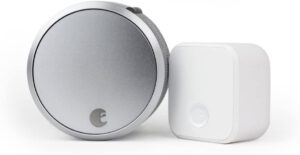
Built-in WiFi provides remote access without an additional hub, and the August app handles permanent, scheduled, and temporary access sharing — useful for letting in a dog walker on Tuesday afternoons or giving your contractor a one-week access window. HomeKit integration allows you to incorporate the lock into Apple Home automations, and the auto-lock feature engages the deadbolt automatically after your specified delay. The 4th Generation is noticeably smaller and quieter than previous August models, which addresses one of the main complaints buyers had about earlier versions.
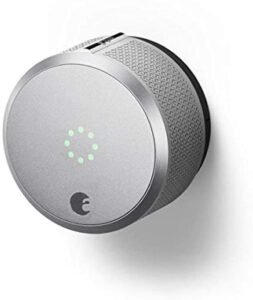
The August 4th Gen does not support Apple Home Key — you'll use the app, Siri, or auto-unlock rather than a physical tap-to-enter experience. If Home Key is a priority for you, the Schlage Encode Plus or Aqara U100 are better fits. If your priority is the easiest possible retrofit installation with solid HomeKit and remote access, August remains the benchmark in 2026.
Pros:
- Installs over existing deadbolt in approximately 10 minutes — no door modification required
- Built-in WiFi for remote access without an additional hub
- Flexible access sharing — permanent, scheduled, or temporary via August app
- Works with Apple HomeKit, Alexa, and Google Assistant
- Keeps your existing exterior hardware and physical keys intact
Cons:
- No Apple Home Key support — tap-to-unlock NFC is not available
- No exterior keypad — app or voice control only unless you add a smart keypad separately
- Interior housing is visible and somewhat bulky compared to the Level Lock+
6. Yale Assure Lock 2 Deadbolt — Best for Keypad-First Households
Yale has been manufacturing locks since 1840, and the Assure Lock 2 brings that institutional credibility into the connected home with a thoughtfully designed keypad deadbolt that fits most standard US entry doors using nothing more than a screwdriver. The keypad-forward design serves households where not everyone uses a smartphone reliably — kids who come home from school before parents, older relatives who find app-based unlocking confusing, or guests who need code access without you sharing your Apple credentials. Everyone can choose their preferred unlock method: the keypad, voice assistant, Auto-Unlock via the Yale Access App, or Apple Watch.
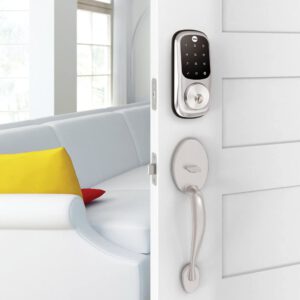
DoorSense is one of Yale's standout proprietary features — it detects whether your door is physically closed before engaging the auto-lock, so you'll never find yourself locked out because the bolt threw while the door was ajar. The lock connects over 2.4 GHz WiFi (US and Canada only) and integrates with the Yale Access ecosystem alongside HomeKit. Remote access, activity logs, and code management all work through the Yale app, and the lock handles most standard US entry doors without requiring specialty hardware or door modifications beyond swapping the existing deadbolt.
The Assure Lock 2 doesn't support Apple Home Key, and some buyers report that the touchscreen keypad requires a firm press in cold temperatures. Those are real trade-offs worth noting, but for families and shared households where reliable keypad access for multiple people is the primary requirement, Yale's combination of brand heritage, DoorSense technology, and clean HomeKit integration makes this a strong 2026 pick.
Pros:
- DoorSense technology confirms door is closed before auto-locking — prevents lockouts
- Multiple unlock methods: keypad, app, Auto-Unlock, voice, Apple Watch
- Installs with a screwdriver on most standard US entry doors — no locksmith needed
- 150+ years of Yale lock manufacturing heritage and quality standards
- Works with HomeKit, Alexa, and Google Assistant simultaneously
Cons:
- No Apple Home Key NFC tap-to-unlock support
- Only works on 2.4 GHz WiFi networks and is limited to US and Canada
- Touchscreen keypad may be less responsive in very cold weather
7. ULTRALOQ U-Bolt Pro WiFi Smart Lock — Best for Maximum Unlock Method Options
If your main criterion for a smart lock is "I want as many ways to unlock this door as possible," the ULTRALOQ U-Bolt Pro is built specifically for you. It markets itself as an 8-in-1 keyless entry system — AI-powered fingerprint recognition, touchscreen keypad, app remote control, auto-unlock as you approach, auto-lock when the door closes, web portal access, eKey sharing, and voice control via Alexa and Google Assistant — and it delivers on all eight of those modes reliably. Built-in WiFi connects directly to your 2.4 GHz network without a hub, and the included door sensor provides awareness of whether your door is physically open or closed, not just whether the bolt is extended.
The AI-powered fingerprint reader is notably responsive, handling a range of finger angles and partial-print presentations better than many competitors in this price range. eKey sharing allows you to grant access to family members, houseguests, or Airbnb renters remotely without being physically present, and temporary or scheduled access windows make it practical for property management scenarios. You'll also get alerts when the door is unlocked or left open, which is useful if you have children, forgetful roommates, or simply want accountability about who's coming and going throughout the day.
The U-Bolt Pro's HomeKit integration is functional but worth noting: it requires the ULTRALOQ app as the primary management interface, and the HomeKit integration works as a secondary control layer rather than the primary one. If you want a lock where the Home app is your primary dashboard, you'll find the experience more seamless with Schlage or Aqara. But if your priority is maximum physical access versatility at a competitive price point, the U-Bolt Pro covers more unlock scenarios than any other lock in this roundup.
Pros:
- 8 distinct unlock methods including fingerprint, keypad, app, and auto-unlock
- AI-powered fingerprint reader handles varied angles and partial prints reliably
- Built-in WiFi — no hub required for remote access
- Door sensor confirms physical door status, not just bolt position
- IP65 waterproof rating for exposed exterior installations
- eKey sharing for remote access management — ideal for rentals and multi-user properties
Cons:
- HomeKit integration is secondary to the ULTRALOQ app — less seamless than native-first HomeKit locks
- Physical size is larger than minimalist competitors like Level or August
- No Apple Home Key NFC support
How to Pick the Best HomeKit Smart Lock
Not every HomeKit lock is the right fit for every door. Before you commit to a specific model, work through these four criteria against your specific situation to avoid a return trip to the post office.
1. Connectivity Method: Built-in WiFi vs. Hub vs. Thread
Your connectivity choice determines how the lock communicates with the outside world, and each approach has real trade-offs that affect your daily experience.
- Built-in WiFi (Schlage Encode Plus, August 4th Gen, Yale Assure Lock 2, ULTRALOQ U-Bolt Pro): Simplest setup — connects directly to your router with no extra devices. Dependent on your WiFi being up and 2.4 GHz band being available at the door.
- Hub/Bridge required (Level Lock+, Aqara U100): Adds a purchase and an additional device to manage, but often delivers more stable connectivity by offloading communication to dedicated hardware.
- Thread (ThorBolt X1): The most future-proof option — creates a mesh with your Apple home hub for ultra-reliable, low-latency control, but requires a Thread-enabled Apple TV 4K or HomePod within 33 feet.
2. Apple Home Key vs. Standard HomeKit
Apple Home Key is the NFC-based tap-to-unlock feature that stores a digital key in your Apple Wallet, letting you unlock your door by touching your iPhone or Apple Watch to the lock — even when the device is powered off. It's a meaningfully different experience from opening an app or using Siri, and it's worth deciding upfront whether you want it.
- Home Key supported: Schlage Encode Plus, Level Lock+, ThorBolt X1, Aqara U100
- HomeKit without Home Key: August 4th Gen, Yale Assure Lock 2, ULTRALOQ U-Bolt Pro
If you're also building out your Google Home ecosystem alongside Apple, check out our guide to the best smart locks for Google Home for cross-platform options.
3. Installation Type: Full Replacement vs. Retrofit
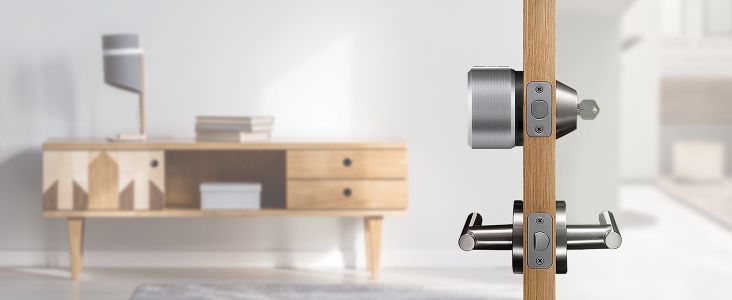
Most HomeKit locks replace your existing deadbolt entirely — you remove the old hardware and install the new lock in its place. If you want to understand how deadbolts are constructed before you start, that's a worthwhile 10-minute read before unboxing. August and Level take a different approach: both preserve your existing exterior hardware and mount either on top of the thumbturn (August) or inside the cylinder (Level), which matters for renters, HOA members, and anyone with premium exterior hardware they don't want to replace.
4. Access Management Depth and User Count
Consider how many people need access to your home and how those access needs vary. A single-person apartment has very different requirements from a vacation rental property or a household with children, elderly relatives, and a rotating cast of service providers.
- High user count: Schlage Encode Plus (100 codes), ThorBolt X1 (100 passcodes + 100 fingerprints across 50 users), ULTRALOQ U-Bolt Pro (eKey + codes)
- Guest/temporary access: August (scheduled access windows), Aqara U100 (one-time local passwords), Yale Assure Lock 2 (code management via Yale app)
- Minimal but elegant: Level Lock+ (requires keypad add-on, but elegantly managed via app)
If you encounter issues with your lock mechanism down the road, our door lock problems and repair guide covers the most common failures and how to troubleshoot them before calling a locksmith.
Common Questions
Do HomeKit smart locks work without an internet connection?
Most HomeKit-compatible locks retain local Bluetooth functionality even when your WiFi or internet connection is down, meaning you can still unlock from your iPhone when you're physically close to the door. Remote access — controlling the lock from outside your home network — requires an active internet connection and, for some locks, a functioning Apple home hub or Wi-Fi bridge. Thread-based locks like the ThorBolt X1 maintain local control through the Thread mesh as long as your Apple home hub is powered, even without internet access.
What is Apple Home Key and which locks support it in 2026?
Apple Home Key is an NFC-based feature that stores a digital key in your Apple Wallet, allowing you to unlock your door by tapping your iPhone or Apple Watch against the lock — similar to how you'd tap to pay at a retail checkout. The technology works even when your device is powered off or has no cellular signal. In this roundup, Apple Home Key is supported by the Schlage Encode Plus, Level Lock+, ThorBolt X1, and Aqara U100. The August 4th Gen, Yale Assure Lock 2, and ULTRALOQ U-Bolt Pro use standard HomeKit integration without NFC tap-to-unlock.
Do I need an Apple home hub to use a HomeKit lock?
For basic local control — unlocking from your iPhone when you're at home — you generally don't need a home hub. However, remote access from outside your home network, sharing Home Key access with guests, and running automations that trigger when you arrive or leave all require an Apple home hub: an Apple TV 4K, HomePod, or HomePod mini. The ThorBolt X1 additionally requires a Thread-enabled home hub within 33 feet for any remote functionality. For non-Thread locks using their own WiFi or bridge connectivity, remote access may be available without a HomeKit hub through the manufacturer's own app.
How secure are HomeKit smart locks compared to traditional deadbolts?
HomeKit smart locks from reputable manufacturers are generally very secure, and in some ways more accountable than traditional deadbolts — you get activity logs, remote monitoring, and the ability to revoke access codes immediately if a key is lost or a relationship changes. Apple's HomeKit encryption standard requires third-party certification, which means every HomeKit-certified lock has passed a security review process. Physical security still matters: look for ANSI Grade 1 certification (Schlage Encode Plus carries this rating) for the strongest deadbolt mechanism. The main vulnerability introduced by smart locks is software attack surface, which is why keeping firmware updated is important for long-term security.
Can a HomeKit smart lock work with Alexa or Google Home at the same time?
Several locks in this roundup support multiple voice ecosystems simultaneously. The Aqara U100 is the most versatile, supporting Apple HomeKit, Google Home, Alexa, and IFTTT concurrently when paired with an Aqara Zigbee 3.0 hub. The August 4th Gen, Yale Assure Lock 2, and ULTRALOQ U-Bolt Pro also work with both Alexa and Google Assistant alongside HomeKit. The ThorBolt X1 is iOS-only and does not support Alexa or Google Home. The Level Lock+ supports Apple Home, Alexa, and Google Home. If cross-platform support is a priority, the Aqara U100 or August 4th Gen offer the broadest ecosystem coverage.
How long do the batteries last in HomeKit smart locks?
Battery life varies significantly by connectivity method and usage frequency. WiFi-enabled locks (Schlage Encode Plus, Yale Assure Lock 2, ULTRALOQ U-Bolt Pro, August 4th Gen) typically last 3 to 6 months on AA batteries under normal household use. Bluetooth-primary locks with bridge connectivity tend to last longer since the radio is lower power. The Level Lock+ has shorter battery life than full-size competitors due to its compact cylinder design, with many users reporting replacement every 2 to 3 months under daily use. All locks provide low-battery notifications through their respective apps, and most include a backup mechanical key entry for emergencies when batteries are fully depleted.
Buy on Walmart
- Schlage Encode Plus Smart Wi-Fi Lock for Front Door, Keyless — Walmart Link
- Level Lock+ WiFi Deadbolt Smart Lock - World's Smallest Smar — Walmart Link
- ThorBolt X1 Apple Home Key Lock, iOS ONLY Smart Keyless Entr — Walmart Link
- Aqara Smart Lock U100, Fingerprint Keyless Entry Door Lock w — Walmart Link
- August Home, Matte Black Wi-Fi Connected Smart Keyless Entry — Walmart Link
- Yale Security Assure Lock 2 Deadbolt, Black Suede Keyed Smar — Walmart Link
- ULTRALOQ U-Bolt Pro WiFi Smart Lock with Door Sensor, 8-in-1 — Walmart Link
Buy on eBay
- Schlage Encode Plus Smart Wi-Fi Lock for Front Door, Keyless — eBay Link
- Level Lock+ WiFi Deadbolt Smart Lock - World's Smallest Smar — eBay Link
- ThorBolt X1 Apple Home Key Lock, iOS ONLY Smart Keyless Entr — eBay Link
- Aqara Smart Lock U100, Fingerprint Keyless Entry Door Lock w — eBay Link
- August Home, Matte Black Wi-Fi Connected Smart Keyless Entry — eBay Link
- Yale Security Assure Lock 2 Deadbolt, Black Suede Keyed Smar — eBay Link
- ULTRALOQ U-Bolt Pro WiFi Smart Lock with Door Sensor, 8-in-1 — eBay Link
Next Steps
- Confirm your door compatibility — measure the backset (typically 2-3/8" or 2-3/4") and check whether your door has a single-cylinder deadbolt before ordering any full-replacement lock.
- Check your Apple home hub situation — if you want remote access and Home Key sharing, verify you have an Apple TV 4K, HomePod, or HomePod mini already set up before your lock arrives.
- Compare current prices on Amazon — prices on smart locks fluctuate frequently, and several of these models go on sale during major shopping events throughout 2026.
- Read recent verified buyer reviews — filter for reviews from the past 90 days on Amazon to catch any firmware or connectivity issues that may have emerged after the product's initial launch.
- Decide on your primary unlock method — if Apple Home Key tap-to-unlock is non-negotiable, narrow your shortlist to the Schlage Encode Plus, Level Lock+, ThorBolt X1, or Aqara U100 before comparing price and installation type.


About Vincent Foster
Greetings, This is Tom Vincent. I’m a home Security Expert and Web developer. I am a fan of technology, home security, entrepreneurship, and DIY. I’m also interested in web development and gardening. I always try to share my experience with my reader. Stay Connected and Keep Reading My Blog. Follow Me: Facebook, Twitter, Pinterest
Now you can get FREE Gifts. Or latest Free Security Cameras here.
Disable Ad block to reveal all the gifts. Once done, hit a button below