When it comes to the ring vs arlo video doorbell debate, most buyers want a direct answer before diving into specs: Ring is the stronger pick for Amazon-first households that value simplicity, while Arlo edges ahead for users who want higher video resolution, wider field of view, and broader smart home platform support. Both are well-supported options in the video doorbell category — the right choice comes down to how each fits an existing setup.
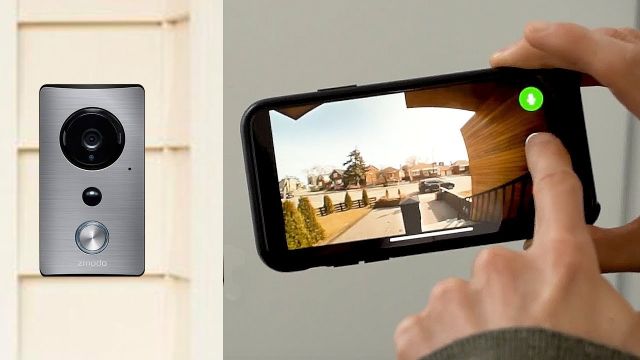
Video doorbells have become a standard part of home security setups rather than a novelty add-on. Ring and Arlo helped drive that shift, and each built a loyal user base by solving different problems. Ring succeeded by making the category accessible and tightly integrated with Amazon's ecosystem. Arlo built its reputation on hardware quality and a more open approach to platform compatibility — appealing to users running cameras, locks, and alarms across multiple brands.
This comparison breaks down what actually separates the two across real-world use: installation experience, video quality, subscriptions, smart home integration, common setup mistakes, and troubleshooting. The goal is a clear picture that helps match the right device to real needs — not just a spec sheet.
Contents
- Understanding Video Doorbells: Ring and Arlo at a Glance
- Which System Works for Beginners vs. Tech-Savvy Users
- Pricing, Subscriptions, and Long-Term Costs
- Getting the Most Out of Either Doorbell
- Mistakes to Avoid When Choosing or Installing
- Solving Common Issues with Ring and Arlo Doorbells
- Frequently Asked Questions
- Final Thoughts
Understanding Video Doorbells: Ring and Arlo at a Glance
The modern video doorbell is a purpose-built security device — not just a camera bolted to a door frame. According to Wikipedia's overview of video door phones, the concept dates back decades, but cloud connectivity and AI-powered motion detection are what transformed consumer expectations for the category. Both Ring and Arlo operate in that evolved space, with distinctly different approaches.
Ring was acquired by Amazon in 2018 and has since grown into one of the most recognizable home security brands in North America. Its product line spans battery-powered, wired, and solar-capable doorbells. The Ring app is central to the experience, and Alexa integration is native — visitor announcements through Echo speakers, for instance, require zero additional configuration. For households already running a broader home security camera system, Ring fits cleanly into an Amazon-first setup.
Arlo started as a Netgear spin-off and positioned itself as a premium camera and doorbell brand. Its products consistently deliver higher resolution sensors, wider fields of view, and more granular software settings than Ring's equivalent tiers. Arlo also supports Apple HomeKit and Google Home natively, making it a natural fit for homes not built around Amazon's ecosystem.
What Sets These Two Brands Apart
The meaningful differences come down to three core areas:
- Ecosystem allegiance: Ring belongs to Amazon; Arlo works across Alexa, Google Home, and Apple HomeKit
- Video quality ceiling: Arlo's hardware generally delivers sharper footage at wider viewing angles at similar price points
- Storage flexibility: Arlo supports local USB storage via SmartHub on select models; Ring does not offer any local storage option
Neither brand is objectively better across the board. The decision depends on which ecosystem a home is already running and what trade-offs matter most — subscription cost, video quality, or smart home depth.
Which System Works for Beginners vs. Tech-Savvy Users
Ring: Approachable by Design
Ring has built its reputation largely on accessibility. The setup process is guided step-by-step through the app, and most users have the device live within 20–30 minutes of opening the box. The interface is consistent across devices, notifications are reliable, and Ring's support documentation is among the most thorough in the category.
For buyers replacing a traditional wired doorbell, Ring's wired models are a natural upgrade. The Pro 2 in particular is popular because it eliminates battery management entirely. Ring Chime devices — small plug-in speakers — extend alert range indoors without requiring an Amazon Echo, a practical option for larger homes where the built-in chime may not carry.
Pro tip: Ring doorbells require a minimum upload speed of 2 Mbps for smooth live streaming — test upload speed specifically, not just download, before installation to avoid buffering complaints later.
First-time video doorbell buyers often benefit from understanding how these devices relate to other front-entry security tools. The breakdown of video doorbells versus standalone security cameras covers the key trade-offs clearly for those still evaluating the category.
Arlo: More Control for Advanced Users
Arlo rewards users willing to invest time in configuration. The app exposes more customization than Ring's interface — granular activity zones, per-zone sensitivity thresholds, custom notification schedules, and detailed motion history logs. The Essential Video Doorbell offers a 180-degree field of view compared to Ring's typical 150–160 degrees, which makes a noticeable difference on wide porches and driveways.
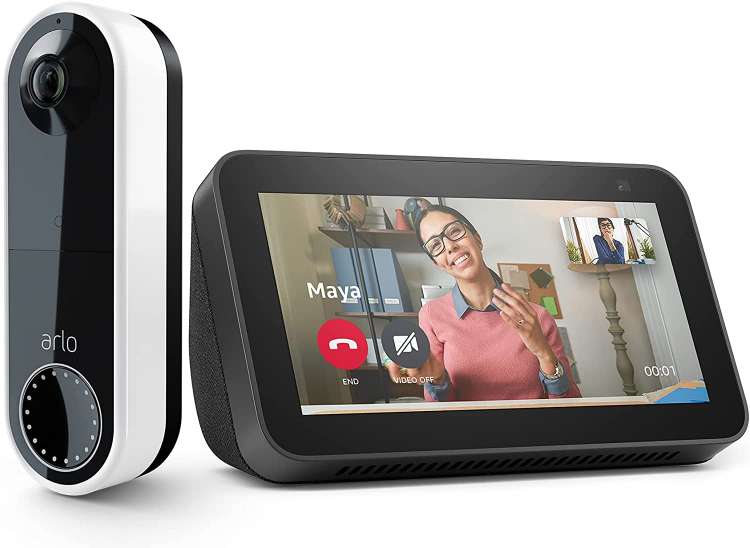
Arlo's native HomeKit support is a genuine differentiator for Apple-centric households. HomeKit Secure Video routes footage through encrypted iCloud storage, which can bypass the need for Arlo's own cloud subscription in that specific configuration. For mixed-brand smart home environments — combining cameras, alarms, and locks from different manufacturers — Arlo's broader platform support gives it a clear advantage over Ring's Amazon-first approach.
Pricing, Subscriptions, and Long-Term Costs
Upfront Hardware Costs
Hardware pricing is competitive at entry levels, with Arlo's premium models carrying a higher price. The table below reflects typical retail pricing across comparable tiers:
| Model | Approx. Price | Resolution | Field of View | Power | Local Storage | Works With |
|---|---|---|---|---|---|---|
| Ring Video Doorbell (base) | ~$100 | 1080p | 155° | Battery / Wired | No | Alexa |
| Ring Video Doorbell Pro 2 | ~$250 | 1536p | 150° × 150° | Wired only | No | Alexa |
| Arlo Essential Video Doorbell | ~$150 | 1536p | 180° | Battery / Wired | Via SmartHub | Alexa, Google, HomeKit |
| Arlo Essential Wired Doorbell | ~$100 | 1536p | 180° | Wired only | Via SmartHub | Alexa, Google, HomeKit |
Prices vary by retailer and promotion. The key takeaway from the hardware comparison alone is that Arlo delivers higher resolution and a wider field of view at comparable or lower price points — which makes the spec-for-spec hardware comparison favor Arlo across most tiers.
Subscription Plans Compared
The long-term cost picture is where the comparison becomes more nuanced. Both brands gate recorded video history behind a paid plan, but the structure differs:
- Ring Protect Basic: ~$5/month per device, 60-day video history, snapshot capture, person alerts
- Ring Protect Plus: ~$10/month, covers all Ring devices at a single address, same history depth
- Arlo Secure: ~$8/month per device, 30-day history, AI-powered person/package/vehicle detection
- Arlo Secure Plus: ~$13/month for unlimited cameras, expanded detection, 24/7 emergency response integration
Arlo's local storage option via SmartHub is meaningful for cost-conscious buyers — it enables basic recording without a cloud subscription, though AI detection features still require a paid plan. Ring offers no equivalent. Those looking to reduce reliance on Ring's subscription service can explore options for saving Ring doorbell footage without a subscription, though those methods come with notable limitations compared to Arlo's native local storage path.
Getting the Most Out of Either Doorbell
Placement and Connectivity Tips
Doorbell placement affects both video quality and motion detection reliability more than most buyers anticipate. Both manufacturers recommend mounting at 7–8 feet above ground level, angled slightly downward. At that height, the camera captures facial detail without cropping visitors' heads or missing packages left at the threshold.
- Aim the camera toward the primary approach path, not directly at the street
- Avoid west- or south-facing positions that catch extended afternoon sun
- Use an angle mount bracket if the wall runs parallel to the approach rather than perpendicular
- Test live view from the intended mounting height before drilling
Wi-Fi signal strength is the most common limiting factor for video quality in real-world installs. Arlo's newer doorbells support dual-band (2.4 GHz and 5 GHz); some Ring models are 2.4 GHz only. A Wi-Fi range extender positioned near the front door often resolves connectivity issues more effectively than router configuration changes alone.
Warning: Mounting either doorbell in a location with prolonged direct sunlight can cause overheating and significantly reduce battery lifespan — check the spot at midday before committing to a permanent install position.
Integrating with a Smart Home Setup
Both doorbells support automation triggers, but integration depth varies by platform. Ring connects natively with Alexa routines — a doorbell press can trigger smart lights, unlock a compatible lock, or announce through Echo speakers automatically. Arlo achieves the same results through Google Home and Siri Shortcuts in addition to Alexa, giving HomeKit users native options that Ring simply cannot match.
For buyers adding a video doorbell as part of a broader front-entry upgrade, it is worth considering the full picture. Those exploring connected locks alongside their doorbell will find the question of whether smart locks are secure to be a practical starting point before purchasing both devices together.
Mistakes to Avoid When Choosing or Installing
Skipping the Compatibility Check
Purchasing a wired doorbell without verifying existing wiring is one of the most avoidable mistakes in the category. Both Ring and Arlo wired models require a transformer rated at 16–24VAC. Older homes often have lower-voltage transformers or mechanical chimes that buzz continuously, fail to ring at all, or ring without stopping after a smart doorbell is installed.
Ring includes a Pro Power Kit with its wired models to address transformer compatibility issues. Arlo ships an in-line adapter with the Essential Wired Doorbell for similar purposes. Even with these included accessories, confirming chime box compatibility before purchasing is the safer approach. A detailed walkthrough on fixing a doorbell chime box covers the most common wiring and compatibility problems and their solutions.
- Check existing transformer voltage before buying any wired model
- Confirm the chime box model is listed on the manufacturer's compatibility page
- Battery-powered models bypass this entirely — useful in older homes with outdated wiring
- In homes with very old transformers, an electrician upgrade may be necessary before installation
Overlooking Storage Options
A common misconception is that video is automatically saved at all times. Both Ring and Arlo provide live view access without a subscription, but event history and recorded clips require an active paid plan on both platforms. Arlo's local storage path via SmartHub is a meaningful differentiator for users who want to avoid monthly costs — Ring offers no equivalent option.
Framing the doorbell decision within a broader home security strategy also helps set realistic expectations. Those beginning to build out their setup benefit from understanding how home security systems fit together before committing to individual components like doorbells or cameras in isolation.
Solving Common Issues with Ring and Arlo Doorbells
Connectivity and Motion Detection Problems
Most reported issues with Ring and Arlo doorbells fall into a small number of repeating categories, and the root causes are usually identifiable without professional help:
- Delayed notifications: Almost always a bandwidth or signal problem. Upload speed below 2 Mbps causes buffering and push notification lag. Test the connection at the doorbell's location before blaming the device.
- Missed motion events: Sensitivity set too low, or the activity zone includes high-traffic areas like a busy street. Reducing zone size and raising sensitivity typically resolves this without increasing false alerts indoors.
- Live view not loading: Often network congestion during peak usage hours. Switching to a 5 GHz connection where supported improves throughput significantly.
- False nighttime alerts: Both cameras use infrared night vision, which triggers on nearby insects and moving foliage. Adjusting the activity zone to exclude vegetation adjacent to the mounting point usually eliminates these.
Arlo users experiencing persistent disconnections should verify that the Arlo SmartHub (if used) is within clear line-of-sight of both the router and the doorbell. Ring users can run a Device Health check directly within the app, which reports real-time signal strength and connection quality at the device level without requiring any additional tools.
For homeowners building out broader front-entry coverage beyond the doorbell itself, understanding placement and overlap strategies matters. A look at types of spy cameras and how they are typically used can inform a more layered approach to entryway surveillance.
Chime and Power Issues
Wired doorbells occasionally cause chime problems post-installation — buzzing, continuous ringing, or complete silence. These issues typically trace back to a transformer voltage mismatch or an incompatible mechanical chime. Installing the included power kit accessories resolves most cases. If the problem persists, a digital chime bypass or a standalone Ring Chime/Arlo Chime accessory can serve as a reliable workaround without rewiring.
Battery performance is the primary concern for wireless models. In colder climates, lithium-ion output drops noticeably below freezing — both Ring and Arlo use lithium-ion cells, which perform better than alkaline alternatives in cold but are still affected. Cold-weather users should expect shorter charge cycles and plan for more frequent recharging during winter months.
Solar accessories are available for both brands. Ring's Solar Charger and Arlo's Solar Panel each extend battery life significantly in sunny climates — in favorable conditions, they can eliminate the need to remove and recharge the battery altogether. This option is worth factoring into the long-term cost comparison, particularly for installations in high-sun regions.
Frequently Asked Questions
Is Ring or Arlo better for Amazon Alexa households?
Ring integrates more deeply with Alexa. Visitor announcements through Echo speakers, two-way talk from Alexa-enabled displays, and Alexa Guard compatibility all work natively with Ring. Arlo supports Alexa but its depth of integration is less extensive than what Ring offers within the Amazon ecosystem.
Does Arlo work without a subscription?
Arlo doorbells provide live view and basic motion alerts without a subscription. Recorded video history requires an Arlo Secure plan, though local storage via a SmartHub enables basic recording without cloud subscription dependency on compatible models. HomeKit Secure Video also bypasses Arlo's subscription requirement for iCloud-stored footage.
Which doorbell has a wider field of view?
Arlo's Essential Video Doorbell offers a 180-degree field of view, wider than most Ring models which typically cover 150–160 degrees. The wider angle captures more of broad entryways and side approaches, making it particularly useful for homes with large covered porches or angled driveways.
Can Ring doorbells save video locally without a subscription?
Ring does not support native local storage. All recorded event history is held in Amazon's cloud and requires an active Ring Protect subscription to access. Some third-party workarounds exist for capturing live streams locally, but they involve additional hardware and configuration complexity.
Do Ring and Arlo both work with Apple HomeKit?
Arlo supports Apple HomeKit natively, enabling HomeKit Secure Video with encrypted iCloud storage and local motion processing. Ring does not support HomeKit. For households running an Apple-first smart home, this is one of the most significant differentiators between the two brands.
How long do Ring and Arlo doorbell batteries typically last?
Battery life varies by usage frequency and climate. Under normal conditions, Ring battery doorbells typically last six to twelve months per charge. Arlo's battery doorbell averages three to six months. High-traffic locations, frequent live view sessions, and cold temperatures reduce both figures noticeably.
Final Thoughts
The ring vs arlo video doorbell decision ultimately comes down to ecosystem fit and priorities — Ring wins for Amazon-first homes that value ease of use and deep Alexa integration, while Arlo earns the edge for users who want superior video resolution, local storage options, and cross-platform compatibility with Apple HomeKit and Google Home. Both are reliable, well-supported products that hold up under real-world conditions. Those ready to move forward can explore the full video doorbell buying guide to compare specific models side by side and find the right fit for their front door.


About Vincent Foster
Greetings, This is Tom Vincent. I’m a home Security Expert and Web developer. I am a fan of technology, home security, entrepreneurship, and DIY. I’m also interested in web development and gardening. I always try to share my experience with my reader. Stay Connected and Keep Reading My Blog. Follow Me: Facebook, Twitter, Pinterest
Now you can get FREE Gifts. Or latest Free Security Cameras here.
Disable Ad block to reveal all the gifts. Once done, hit a button below