5 Best Smart Deadbolt Locks of 2026 – How to Choose the Right One
by Vincent Foster
The best smart deadbolt locks for most homeowners are the Schlage Connect, ULTRALOQ U-Bolt Pro, Schlage Sense, Reagle, and Kwikset SmartCode 913 — each solving a different problem at a different price point. Before you pick one, spend five minutes learning how smart locks work so you know exactly which features matter for your setup.
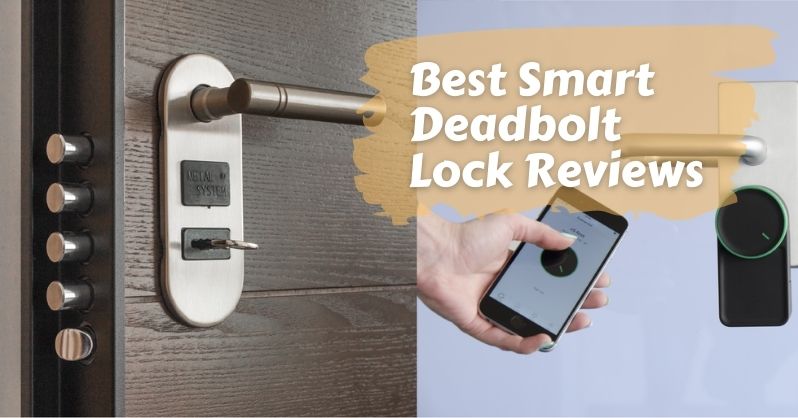
Smart deadbolts replace your existing deadbolt and add a keypad, app control, or biometric entry to your front door. Installation typically takes 20–30 minutes. No electrician needed — these locks run on standard AA batteries, and your existing door frame stays exactly as it is.
This guide covers a side-by-side comparison, common buying mistakes, real pricing, myths worth debunking, and a breakdown by use case. If you want to pair your new lock with a camera setup, the camera reviews section has options that complement any of these deadbolts well.
Contents
- At a Glance: Best Smart Deadbolt Locks Side by Side
- Mistakes Most People Make When Buying a Smart Deadbolt
- What You'll Actually Spend: Smart Deadbolt Pricing Breakdown
- Smart Lock Myths You Should Stop Believing
- Who Should Actually Get a Smart Deadbolt Lock?
- Fixing Common Smart Deadbolt Problems
- Basic vs. Feature-Rich: Which Tier Is Right for You?
- Frequently Asked Questions
- Key Takeaways
At a Glance: Best Smart Deadbolt Locks Side by Side
The Five Locks Worth Knowing
These five models represent the range from no-frills keypad to full biometric smart lock. Here's a look at each one before the comparison table.
1. Schlage Connect Camelot (Z-Wave)
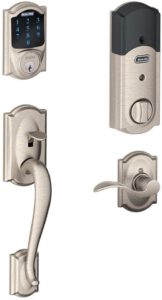
The Schlage Connect is the go-to choice for anyone with an existing smart home hub. It uses Z-Wave (a wireless protocol for home automation) and works with SmartThings, Wink, Alexa, and Google Home. Schlage's ANSI Grade 1 certification makes it one of the most physically secure locks on this list — it resists drilling, picking, and kick-in attacks better than most residential deadbolts.
- Best for: Smart home hub owners, Z-Wave setups
- Entry methods: backlit touchscreen keypad + physical key
- Built-in alarm sensor detects tampering and door attacks
- Stores up to 30 access codes
- Requires a Z-Wave hub for remote app access — Bluetooth-only pairing is not available
2. ULTRALOQ U-Bolt Pro
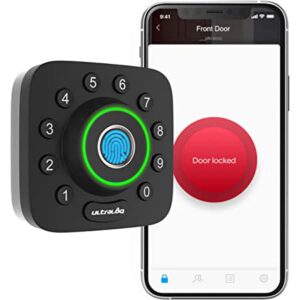
The U-Bolt Pro is the most versatile pick here. It offers six entry methods: fingerprint scan, keypad PIN, smartphone Bluetooth tap, voice command, auto-unlock by proximity, and a physical key. The fingerprint reader reads in under half a second, even with wet or dirty fingers. Alexa and Google Home work through the optional ULTRALOQ Bridge Wi-Fi adapter.
- Best for: Households that want multiple entry options without committing to one method
- Anti-peep keypad scrambles which numbers you press most often
- No hub required for local Bluetooth operation
- App setup is guided with photos at each step
3. Schlage Sense
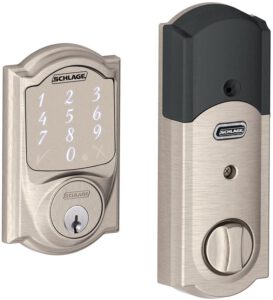
If you live in the Apple ecosystem, the Schlage Sense is the cleanest fit. It's Apple HomeKit certified, responds to Siri voice commands, and integrates tightly with the Apple Home app. Bluetooth is built in. Remote Wi-Fi access requires the Schlage Sense Wi-Fi adapter, sold separately — worth noting before you budget.
- Best for: iPhone and iPad users already using Apple Home
- ANSI Grade 1 certified — same physical security as the Connect
- Stores up to 30 access codes
- Siri commands work locally without a hub
4. Reagle Smart Deadbolt
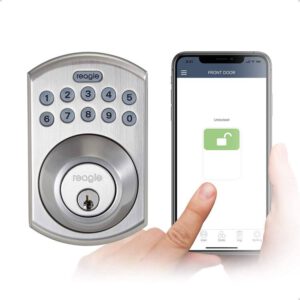
The Reagle is a strong under-the-radar choice. It's Apple HomeKit certified and has built-in Wi-Fi — no bridge or adapter needed. Remote access works right out of the box. It also works with Alexa and Google Assistant, making it one of the most cross-platform options here.
- Best for: Apple HomeKit users who want remote access without buying extras
- Auto-lock timer and timestamped access log included
- Works on both iOS and Android
- Compact design fits most standard door preps
5. Kwikset SmartCode 913
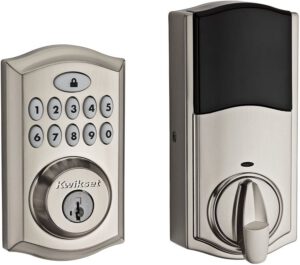
The Kwikset SmartCode 913 is the no-nonsense option. No app, no Wi-Fi, no hub required. You enter a PIN code and the door opens. It stores up to 30 access codes, auto-locks after 30 seconds if you want it to, and uses SecureScreen technology to disguise which numbers you use most often.
- Best for: Budget buyers who only need keyless entry
- No internet connection or smart home system required
- Lowest price point on this list by a significant margin
- Simple to program directly from the keypad — no app involved
Quick Comparison Table
| Lock | Entry Methods | Connectivity | Smart Home | Built-in Wi-Fi | Price Tier |
|---|---|---|---|---|---|
| Schlage Connect Camelot | Keypad, Key | Z-Wave (hub required) | Alexa, Google, SmartThings | No | $$ |
| ULTRALOQ U-Bolt Pro | Fingerprint, Keypad, App, Key | Bluetooth + Wi-Fi Bridge | Alexa, Google | With Bridge add-on | $$ |
| Schlage Sense | Keypad, Key | Bluetooth | Apple HomeKit, Siri | No (adapter sold sep.) | $$ |
| Reagle Smart Deadbolt | Keypad, App, Key | Wi-Fi, Bluetooth | HomeKit, Alexa, Google | Yes | $$ |
| Kwikset SmartCode 913 | Keypad, Key | Standalone (no wireless) | None | No | $ |
Mistakes Most People Make When Buying a Smart Deadbolt
Skipping Compatibility Checks
This is the number one reason people return smart locks. Most deadbolts require a standard door prep — a backset (the distance from the door edge to the lock hole center) of either 2 3/8" or 2 3/4". Get the wrong one and it simply won't fit.
Before you buy anything, verify these four things:
- Door thickness: Most smart locks need doors between 1 3/8" and 2" thick
- Backset measurement: Grab a tape measure — don't guess
- Door material: Metal doors can interfere with some fingerprint readers
- Your smart home platform: Alexa vs. Google vs. Apple HomeKit changes your options dramatically
The Schlage Connect, for example, needs a Z-Wave hub to enable remote access. If you don't have one, you're buying an expensive keypad with no app control. If you're not sure what kind of lock you currently have, the guide to different types of door locks is a good place to start.
Pro tip: Measure your door's backset before you add anything to your cart — a 2 3/8" vs. 2 3/4" mismatch is the single most common reason for a return.
Ignoring Battery Life
Smart locks run on AA or AAA batteries. Battery life ranges from a few months to over a year depending on how often the door is used and how many wireless features are active.
- Schlage Connect: 6–12 months on 4 AA batteries
- ULTRALOQ U-Bolt Pro: 8–12 months on 4 AA batteries
- Kwikset SmartCode 913: 12+ months in typical use
- Reagle (Wi-Fi active): expect shorter cycles — 3–6 months depending on traffic
Most locks alert you via the app or a flashing indicator when battery drops low. Keep a spare set of batteries near the door — especially in a high-traffic home or a rental property you don't visit regularly.
Overlooking Installation Requirements
Installation is usually simple, but a few details catch people off guard:
- Some locks require fully removing your old deadbolt assembly, not just the cylinder
- Z-Wave locks need the hub within 30 feet during initial pairing
- Wi-Fi locks only work on 2.4 GHz networks — not 5 GHz
- If your door frame is off-square or has settled, the bolt may bind and trigger constant "lock failed" errors
That last point is important. A misaligned door is a mechanical issue — software cannot fix it. Address the door frame first, or the lock will fight the frame every single time it cycles.
What You'll Actually Spend: Smart Deadbolt Pricing Breakdown
Entry-Level Options (Under $100)
At this price point you're getting a keypad deadbolt with no internet connectivity. The Kwikset SmartCode 913 sits comfortably here. You can store multiple codes, set auto-lock, and ditch your key entirely — but you won't get remote access, push notifications, or voice assistant support.
- Who it's for: renters, guest houses, garages, secondary entrances
- Main trade-off: you have to be physically present to manage codes
- Still a significant security upgrade over a key-only deadbolt with no code backup
- Budget for AA batteries once or twice a year — minor ongoing cost
Mid-Range Sweet Spot ($100–$200)
This is where most buyers land, and for good reason. You get app control, Bluetooth or Wi-Fi connectivity, and smart home integration. The ULTRALOQ U-Bolt Pro, Schlage Sense, and Reagle all fall in this range.
- Fingerprint and keypad entry both available (ULTRALOQ)
- Push notifications every time the door locks or unlocks
- Timestamped access logs in the app
- Temporary guest codes that expire on a schedule
- Voice assistant support via Alexa, Google, or Siri
The $100–$200 range is the best value zone for most homeowners. You're getting genuine smart features — remote access, activity logs, temporary codes — without spending on enterprise-grade hardware most households will never need.
One thing to watch: some locks in this range charge extra for Wi-Fi. The Schlage Sense needs a separate Wi-Fi adapter (~$30–$50). The Reagle includes Wi-Fi built in. Factor those add-ons into your total before comparing prices.
Premium Picks ($200+)
Above $200, you're paying for:
- Higher physical security certifications (ANSI Grade 1, BHMA Grade 1)
- Built-in Wi-Fi with no bridge required
- Commercial-grade hardware longevity
- Larger code capacity — 50 to 100+ simultaneous users
- More sophisticated audit logging with user-name tagging
For a single-family home with a standard household, the premium tier is more than you need. It starts making sense for vacation rental properties, small apartment buildings, or anyone regularly managing access for ten or more people.
Smart Lock Myths You Should Stop Believing
Myth: Smart Locks Are Easy to Hack
This concern comes up constantly, and it's mostly overblown. Modern smart deadbolts use AES-128 or AES-256 encryption (the same standard banks use) for all Bluetooth and Wi-Fi communication. A remote attacker breaking into your home through a Bluetooth lock is an extremely niche, low-probability scenario.
The much more realistic threats are simpler: someone who has your entry code, a physical door that's easy to kick in, or a camera doorbell with a weak password. According to the Wikipedia overview of deadbolts, the physical security rating of a deadbolt — particularly the strike plate and bolt throw depth — matters far more in real break-in attempts than the electronic layer.
- Use a strong, unique password for your lock's app account
- Enable two-factor authentication if the app supports it
- Change access codes periodically, especially after giving codes to contractors or guests
- Set temporary codes to expire rather than leaving them active indefinitely
The weakest link is almost never the encryption. It's usually a shared code or a door frame with a cheap strike plate. Fix both.
Myth: A Dead Battery Means You're Locked Out
Every smart deadbolt on this list has a physical key override. If the battery dies completely, your backup key works just like any standard deadbolt key. Most locks also feature an emergency 9-volt terminal on the exterior keypad — press a 9V battery to the contacts and it powers the keypad just long enough to enter your code and get inside.
Good to know: All five locks reviewed here include a physical key backup — never discard those keys. Keep one in your car, your wallet, or at a trusted neighbor's house.
Myth: You Need a Locksmith to Install One
You don't. If you can use a Phillips screwdriver, you can install a smart deadbolt. The standard process has four steps:
- Remove the existing deadbolt (usually four screws)
- Thread the new lock's connecting cable through the door hole
- Mount the exterior and interior assemblies and tighten the mounting screws
- Install batteries, download the app, and follow the in-app pairing wizard
Most people finish in 20–30 minutes. Schlage and Kwikset both include clear printed instructions. ULTRALOQ's app walks you through each step with annotated photos. The only time you might want a professional is if your door frame needs adjustment — and that's a carpentry issue, not a lock issue.
Who Should Actually Get a Smart Deadbolt Lock?
Renters and Short-Term Rental Hosts
If you host on Airbnb or a similar platform, a smart deadbolt removes one of the most tedious parts of hosting: key handoffs. You create a temporary code for each guest, set it to expire at checkout time, and never meet in person to exchange anything.
- Recommended options: Reagle or ULTRALOQ U-Bolt Pro — both support temporary codes with scheduled expiry
- Avoid the Kwikset 913 for rental use — you have to be physically present to change codes
- Use the access log to confirm check-in and check-out times remotely
- If you manage multiple properties, look for locks with multi-property support in the app
For renters who don't own their unit: check your lease first. Many landlords are fine with smart locks as long as you don't modify the door and can revert on move-out. Keypad-only options like the Kwikset 913 are easiest to install and remove without a trace.
Families with Multiple Users
Families get a lot of value out of per-person access codes. Each family member has their own PIN. You see in the app who came home and when. No more spare keys hidden under the mat.
- Kids who lose keys don't get locked out of the house anymore
- You can create a temporary code for a dog walker or housekeeper that expires when the arrangement ends
- Auto-lock means the door is never accidentally left unlocked overnight
- Access logs let you verify your teenager actually came home on time
Mid-range locks storing 30–100 codes cover most households easily. For very large families or households with frequent rotating access (like a shared house), look at options that support 50+ codes and named-user logging.
Tech-Forward Homeowners
If you already have a smart home hub — SmartThings, Apple Home, Google Home — a compatible smart lock plugs in as one of the most useful devices in the ecosystem:
- Trigger lights, thermostats, or cameras when the front door unlocks
- Create a "Leaving Home" scene that locks the door, arms the alarm, and turns off lights in one tap
- Get push notifications every time someone enters, even when you're not home
- Set the lock to engage automatically when your security system arms at night
The Schlage Connect (Z-Wave), Reagle (HomeKit), and Schlage Sense (HomeKit) are the strongest picks for smart home integration. Each one plays well within its respective ecosystem and supports automations that standalone locks simply can't offer.
Fixing Common Smart Deadbolt Problems
Lock Won't Connect to the App
This is almost always a Bluetooth range or network configuration issue. Work through this checklist before assuming the lock is defective:
- Stand within 10 feet of the lock during initial pairing — Bluetooth range is short
- Confirm Bluetooth and Location Services are both enabled on your phone
- Delete the lock from the app completely, then re-add it from scratch
- If using Wi-Fi: confirm your router is broadcasting a 2.4 GHz network — smart locks do not connect to 5 GHz
- For Z-Wave locks: make sure the hub is within 30 feet during the first pairing
- Restart your router if the lock previously worked but suddenly dropped off
If pairing keeps failing after all of the above, do a full factory reset. The reset button is usually inside the battery compartment. Hold it for 10 seconds and start the pairing process fresh.
Keypad Not Responding
A non-responsive keypad almost always comes down to one of four causes:
- Low or dead batteries: Replace all batteries at once, even if they seem partial — mismatched battery levels cause erratic behavior
- Moisture: Wipe the keypad dry and wait 30 minutes before testing again
- Lockout mode: Too many incorrect code attempts triggers a 30–60 second lockout — wait it out, then try again
- Factory reset needed: If the keypad stays unresponsive, hold the interior reset button for 10 seconds to restore factory defaults
If you're frequently getting keypad lockouts, it may be a code management issue — check the app to see if old or conflicting codes are stored. Clearing unused codes can resolve phantom lockout triggers.
Deadbolt Misaligned or Stiff
If the motor runs but the bolt won't extend fully, or if it's physically stiff to operate, alignment is the culprit — not software.
- Check the mounting screws: over-tightening warps the assembly. Back them off a quarter turn
- Inspect the strike plate on the door frame — it needs to align precisely with the bolt's path
- Lubricate with a graphite spray. Avoid oil-based lubricants, which attract dust and gum up the mechanism
- If the door has swelled or settled seasonally, you may need to adjust the strike plate position by loosening its screws and shifting it slightly
A motor that strains on every cycle drains your batteries faster and shortens the gearbox lifespan. Address alignment issues early — it's a 10-minute fix that prevents long-term hardware damage.
Basic vs. Feature-Rich: Which Tier Is Right for You?
What a Basic Lock Gets You
A basic smart deadbolt like the Kwikset SmartCode 913 gives you the core benefit — keyless entry — and nothing else. You get:
- A PIN keypad to unlock the door without a key
- Multiple user codes (up to 30 on most basic models)
- An auto-lock timer you can enable or disable
- A physical key backup for emergencies
There's no app, no activity log, no remote access. Changing a code means physically standing at the lock and following the keypad programming sequence. For a storage shed, a back gate, or a second property you visit in person regularly, that's perfectly adequate.
What Upgrades Actually Add
Mid-range and premium locks add features that genuinely change how you manage access. These aren't just marketing extras:
- Remote access: Lock or unlock the door from anywhere via the app — useful when you're not home and need to let someone in
- Access logs: Timestamped records of every entry, tagged by which code was used
- Temporary codes with expiry: Create a code for a one-time delivery, set it to expire in 24 hours, and never think about it again
- Smart home integration: Trigger lights, cameras, or alarms based on lock state
- Fingerprint entry: Fastest entry method available — no phone, no code, just your finger (ULTRALOQ U-Bolt Pro)
- Voice control: Lock the door hands-free when your arms are full of groceries
Making the Final Call
Ask yourself three questions before spending any money:
- Do I need to manage access remotely? If yes, skip any lock without app control.
- Am I already in a smart home ecosystem? Match the lock to your existing platform — don't buy a Z-Wave lock if you don't have a hub.
- How many people need regular access? More users means more value from app-based code management and access logs.
If your answers are "no," "no," and "just my immediate family," a $60–$80 standalone keypad lock is a smart, sensible choice. If you answered yes to any of them, budget $120–$180 and get something with app control and at least Bluetooth connectivity. You'll use those features more than you expect.
Frequently Asked Questions
What is the most secure smart deadbolt lock?
Schlage's ANSI Grade 1 certified locks — both the Connect Camelot and the Sense — offer the highest physical security rating available in residential deadbolts. Grade 1 means the lock withstands 250,000 open-and-close cycles, resists 10 strikes of 75 lb. force, and meets commercial-grade standards. For electronic security, all five locks on this list use encrypted wireless communication that is resistant to standard interception attacks.
Do smart deadbolt locks work without Wi-Fi?
Yes. Most smart deadbolts work locally via keypad or Bluetooth without any internet connection. The Kwikset SmartCode 913 has no wireless connectivity at all and works entirely offline. Bluetooth-based locks like the Schlage Sense and ULTRALOQ U-Bolt Pro function for local entry without Wi-Fi — you only need an internet connection for remote access from outside Bluetooth range.
How long do smart deadbolt batteries last?
Battery life depends on usage frequency and which features are active. A typical household can expect 6–12 months on most mid-range smart locks running on 4 AA batteries. Locks with always-on Wi-Fi drain faster — expect 3–6 months for Wi-Fi-enabled models under regular use. Every lock reviewed here alerts you when battery runs low, so you won't be caught off guard without warning.
Can I install a smart deadbolt on any door?
Most standard residential doors are compatible, but you should measure before buying. Check your door's thickness (typically 1 3/8" to 2"), the backset measurement (2 3/8" or 2 3/4"), and whether a standard single-cylinder deadbolt hole already exists. Doors with non-standard preps or unusual thicknesses may need an adapter kit. Metal doors can sometimes interfere with fingerprint sensors. If you're unsure what hardware you currently have, reviewing the basics of door lock types first will save you time.
Key Takeaways
- The best smart deadbolt locks for most homeowners sit in the $100–$200 range — you get app control, access logs, and smart home integration without overpaying for commercial-grade hardware.
- Always measure your door's backset and thickness before buying — a compatibility mismatch is the most common reason for returns.
- Every smart deadbolt on this list includes a physical key backup, so a dead battery does not mean you're locked out of your own home.
- For Airbnb hosts and multi-user households, temporary access codes with scheduled expiry dates are the single most useful feature to prioritize.


About Vincent Foster
Greetings, This is Tom Vincent. I’m a home Security Expert and Web developer. I am a fan of technology, home security, entrepreneurship, and DIY. I’m also interested in web development and gardening. I always try to share my experience with my reader. Stay Connected and Keep Reading My Blog. Follow Me: Facebook, Twitter, Pinterest
Now you can get FREE Gifts. Or latest Free Security Cameras here.
Disable Ad block to reveal all the gifts. Once done, hit a button below