The August smart lock pro vs Yale Assure comparison has a clear answer: August is the better pick for smart home integration, Yale wins on keypad simplicity. Both earn a spot at the top of the smart lock category, but they're built for different homeowners with different priorities. Get this choice wrong and you'll be fighting your own front door every day.
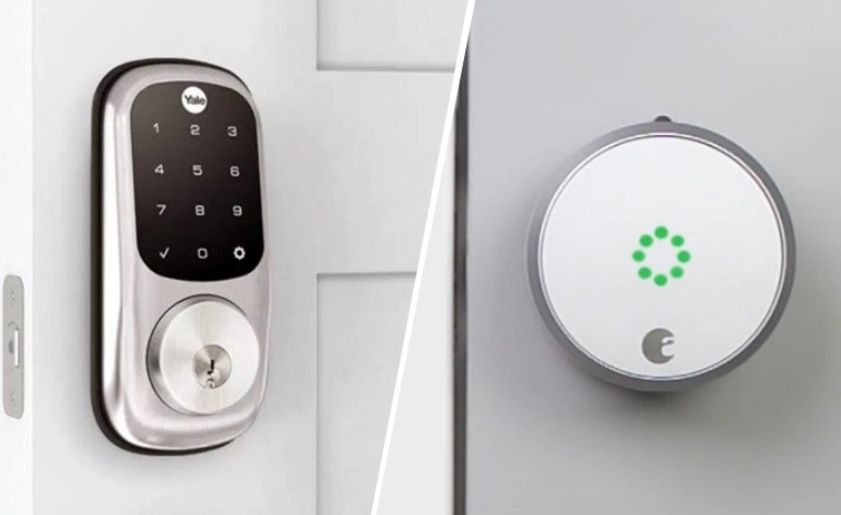
The fundamental difference comes down to hardware philosophy. The August Smart Lock Pro installs over your existing deadbolt's thumb-turn — your old keys still work, and the retrofit takes under 15 minutes. Yale Assure replaces the entire lock cylinder and presents a clean touchscreen keypad on the interior. No key slot. No thumb-turn. Just a code or an app.
That single architectural decision cascades into every aspect of the ownership experience — from how houseguests enter, to which smart home platforms you can connect, to what happens when your phone battery dies at the worst moment. This guide breaks down every relevant dimension so you can pick the right lock the first time.
Contents
- August Smart Lock Pro vs Yale Assure: Breaking Down the Core Differences
- Lock Buying Mistakes That Lead to Instant Regret
- How Each Lock Holds Up in Real Daily Use
- Choosing Based on Your Tech Comfort Level
- Smart Lock Best Practices That Actually Protect You
- Smart Lock Myths You Can Stop Worrying About
- Keeping Your Smart Lock Running at Its Best
August Smart Lock Pro vs Yale Assure: Breaking Down the Core Differences
Before diving into nuance, you need the specs side by side. The table below captures the most important points of divergence. These aren't marketing claims — they're the specific features that will affect you every time you walk through your front door.
| Feature | August Smart Lock Pro | Yale Assure Lock |
|---|---|---|
| Installation Type | Retrofits over existing deadbolt | Full deadbolt replacement |
| Physical Key Access | Yes — existing keys still work | No physical key option (standard models) |
| Keypad | Not included (optional add-on) | Built-in backlit touchscreen |
| Wireless Protocol | Bluetooth + Z-Wave + Zigbee | Bluetooth + Z-Wave (select models) |
| Smart Home Platforms | Alexa, Google Home, Apple HomeKit, SmartThings | Alexa, Google Home, Z-Wave hubs |
| Remote Access | Requires August Connect Wi-Fi Bridge | Requires Yale Access Module or Z-Wave hub |
| Guest Access Method | Virtual keys via app, timed access | Up to 250 entry codes via keypad |
| Auto-Lock | Yes, configurable delay | Yes, configurable delay |
| Battery Life | ~3 months (4 AA batteries) | ~12 months (4 AA batteries) |
| Apple HomeKit Native | Yes | No |
Installation and Hardware
The August Pro's retrofit design is a genuine competitive advantage. You clip it onto your existing deadbolt's interior thumb-turn without touching the exterior hardware — your physical keys continue to function exactly as before. That matters if anyone in your household isn't comfortable with a fully keyless setup. Installation follows a simple guide and most people finish in under 15 minutes. For a detailed walkthrough, this guide on how to install a smart lock on your door covers the full process.
Yale Assure removes your old lock entirely. You get a polished interior panel — no thumb-turn, no key cylinder. The result looks clean and modern, but it commits you fully to the keypad and app ecosystem. If you're replacing a worn-out deadbolt anyway, the swap is straightforward and worthwhile.
Connectivity and App Control
August built its reputation on broad protocol support. The Pro includes Bluetooth, Z-Wave, and Zigbee in one unit — it fits into almost any smart home platform without adapters. Yale Assure offers Bluetooth natively, with Z-Wave on compatible models. Both are solid options for hub-based smart homes, but August's range is wider.
One detail many buyers miss: neither lock offers built-in Wi-Fi. Remote access requires a separate bridge or hub. August sells the Connect Wi-Fi Bridge as an add-on. Yale routes through the Yale Access Bluetooth Module or an existing Z-Wave hub. Factor these into your total cost when comparing price tags at the shelf.
Lock Buying Mistakes That Lead to Instant Regret
Most people who return smart locks made the same two errors before they bought. These mistakes are entirely avoidable — you just have to know what to check in advance.
Ignoring Deadbolt Compatibility
The August Pro fits most standard ANSI/BHMA Grade 2 deadbolts, but not every deadbolt configuration works cleanly with the retrofit design. Older homes and rentals often have non-standard hardware that throws off the fit. Before you purchase, confirm your door thickness (standard range: 1-3/8" to 2"), your backset measurement (2-3/8" or 2-3/4"), and the specific deadbolt brand against August's compatibility list.
- A warped or misaligned door causes auto-lock failures — fix door fit before blaming the lock
- Multipoint locks and surface-mounted bolts won't work with August Pro
- Yale Assure replaces the bolt entirely, so compatibility is less of a concern for the lock body — but your door prep still matters
If you're unsure what type of deadbolt you currently have, this breakdown of the different types of deadbolts will help you identify it quickly before committing to either lock.
Overlooking Hub Requirements
Neither lock is plug-and-play for remote access. This surprises a lot of buyers who expect to control their lock from anywhere with just the app and the lock itself. Bluetooth range tops out at around 30 feet. For remote control, voice commands, and automation — you need additional hardware.
- August Connect Wi-Fi Bridge: unlocks remote access for August Pro via the August app
- SmartThings, Wink, or similar Z-Wave hubs: required for full automation on both locks
- Apple HomeKit users: August Pro is the clear winner — native HomeKit support, no workarounds
- Google Home users: both locks work, but August's integration is more mature
If you're building a full setup from scratch, the August Connect bridge is the fastest path to remote access. If you already run a Z-Wave hub, both locks drop in cleanly — August with slightly more flexibility.
How Each Lock Holds Up in Real Daily Use
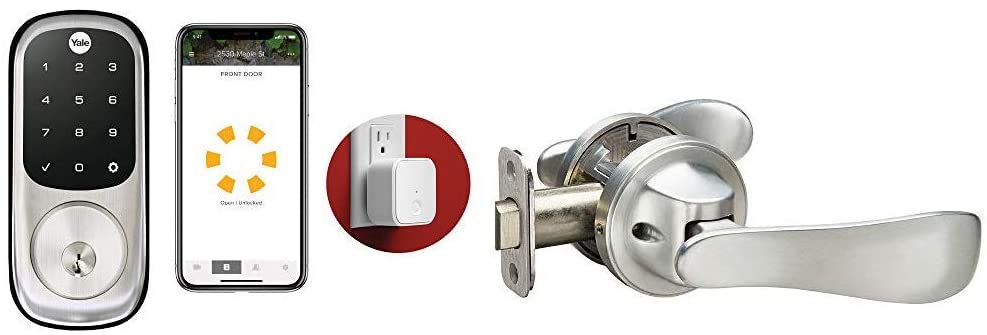
Specs only tell you so much. The experience of living with either lock day after day depends on how your household actually operates — how many people come and go, how tech-comfortable everyone is, and what your access management needs look like.
August Pro in a Multi-Person Home
The August Pro excels in households with multiple people and rotating access needs. You issue virtual keys through the app, each with its own schedule and expiration date. Dog walkers, housekeepers, and relatives each get a window of access — no key copying, no code sharing. The activity log shows you exactly who entered and when, which is valuable if you're managing a short-term rental or just keeping tabs on a busy family schedule.
Auto-unlock uses your phone's GPS to detect arrival and unlock the door as you approach. It works reliably when your phone has charge and Bluetooth is enabled. It's a genuinely convenient feature — but never treat it as your only access method. If your phone dies on the way home, you need a backup.
Yale Assure for Keypad-First Users
Yale Assure is the lock you choose when simplicity for every household member matters more than smart home depth. The backlit touchscreen is responsive and legible in the dark. You enter a code, the door opens. No app, no phone, no Bluetooth pairing. This distinction is enormous if your household includes older family members or kids who shouldn't be navigating a Bluetooth connection just to get inside.
Yale supports up to 250 unique access codes, each schedulable independently. When a houseguest leaves, deleting their code takes two minutes. The full process for managing codes is covered in this guide on how to change the code on an electronic door lock — it applies directly to the Yale Assure interface.
Choosing Based on Your Tech Comfort Level
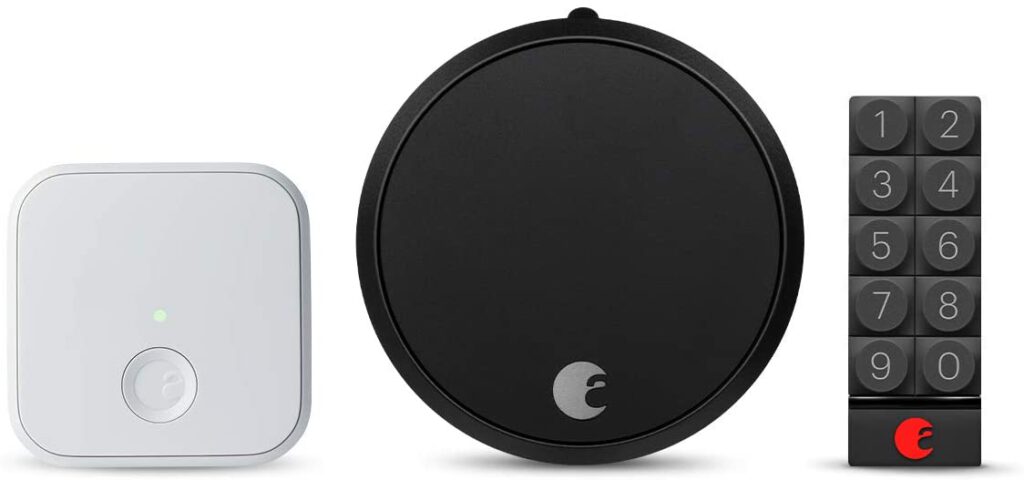
One of the clearest ways to cut through this comparison is to honestly assess where you sit on the smart home spectrum. These two locks serve very different users. If you want broader context before committing, this overview of the 4 common types of smart door locks is worth reading first.
If You're New to Smart Locks
Yale Assure wins this category without contest. The setup process is guided and logical. There are no hub configurations, no protocol choices, no bridge purchases required for the lock to function as intended. You install it, program your codes, and walk away. Everyone in the household can use it on day one without any learning curve.
- No smart home hub needed for core operation
- Guest codes are simple to add, schedule, and delete
- Battery life of roughly a year reduces maintenance friction
- The keypad works for literally every person who walks through your door
If You Run a Full Smart Home
August Pro is the lock designed for smart home power users. Its simultaneous support for Z-Wave, Zigbee, and Apple HomeKit means it slots into virtually every major platform — SmartThings, Amazon Echo, Google Home, Apple Home — without workarounds. You can build real automations: lock the door when the last phone leaves the geofence, trigger lights on arrival, chain the lock into a security scene that activates your camera system at the same time.
The August Pro becomes part of a layered security system rather than just a standalone lock. That integration depth is what separates it from every keypad-only alternative. If building that kind of connected setup is what you're after, August is the unambiguous choice.
Smart Lock Best Practices That Actually Protect You
The hardware is only as secure as the habits you build around it. These practices apply to both locks and make a measurable difference in how well your setup actually protects your home.
Locking Down Your App and Account
Your smart lock app is a digital key. A stolen phone with an unlocked app gives someone else control of your front door. Enable two-factor authentication on your August or Yale account the day you set it up. Use a unique, strong password. Set a PIN or biometric lock on the app itself so that unlocking your phone alone isn't enough to open the door.
Pro tip: Treat your smart lock app with the same security discipline as your banking app — a compromised account is a compromised front door.
- Review guest access quarterly — remove virtual keys or codes for anyone who no longer needs entry
- Check the activity log weekly to catch any unexpected access events early
- If you sell or move out of the property, factory reset the lock before you leave
Building a Reliable Backup Access Plan
Never treat your smart lock as your only access method. The August Pro handles this naturally since your existing keys still function. With Yale Assure, memorize your primary code — don't rely on having your phone available to look it up. Most Yale Assure models include a 9V battery terminal on the exterior face that provides emergency power if the internal batteries are completely dead, allowing one more entry to replace them.
Understanding how smart locks actually work at the mechanical level helps you build a backup plan that accounts for real failure modes — not just the obvious ones. Think through your plan now so you're not improvising at midnight in a rainstorm.
Smart Lock Myths You Can Stop Worrying About
Misinformation about smart lock security spreads quickly. Two myths in particular keep well-intentioned homeowners stuck on traditional deadbolts when they'd be better served by upgrading.
"Smart Locks Are Easier to Hack Than Traditional Locks"
This is the most common objection — and the least supported by evidence. The Bluetooth and Z-Wave protocols used by both August Pro and Yale Assure implement AES-128 encryption, the same standard used by financial institutions worldwide. According to Wikipedia's overview of AES encryption, AES-128 has no known practical vulnerabilities when correctly implemented.
Real-world smart lock breaches overwhelmingly involve weak passwords and shared credentials — not protocol exploits executed on someone's front porch. A burglar is statistically far more likely to kick your door in, pry a window frame, or pick a traditional lock than to execute a Bluetooth attack. Worrying about digital exploits while ignoring physical vulnerabilities is focusing on the wrong threat entirely.
"A Dead Battery Means Getting Locked Out"
Both locks run on 4 AA batteries and begin sending low-battery notifications weeks before actual failure. The app pushes alerts. The lock itself signals audibly and with indicator lights. You receive multiple rounds of warning before anything critical happens.
If you somehow miss every warning, Yale Assure's external 9V terminal provides emergency power for one entry cycle so you can replace the batteries. August Pro users retain physical key access regardless of battery state. Getting locked out due to a dead battery requires consistently ignoring multiple alerts across several weeks — it doesn't happen accidentally to anyone paying basic attention.
Keeping Your Smart Lock Running at Its Best
Smart locks need less upkeep than traditional locks, but zero-maintenance is not realistic. A few consistent habits prevent most problems before they develop into failures.
Battery and Firmware Upkeep
Replace batteries at the first low-battery notification — don't wait for a second warning. Use quality alkaline batteries from established brands. Cheap generics and rechargeable NiMH cells cause unpredictable voltage behavior that can trigger false low-battery alerts or cause the motor to stutter during locking cycles.
- Set a monthly calendar reminder to open the app and check battery status
- Enable automatic firmware updates in the app if your model supports it
- Check manually for firmware updates every few months — manufacturers push patches that fix connectivity bugs and auto-lock reliability issues
- Note the firmware version before and after any update — it helps diagnose behavioral changes if something stops working correctly
Cleaning and Physical Maintenance
The Yale Assure touchscreen and the August Pro's exterior motor housing both accumulate grime over time. Use a dry microfiber cloth for routine cleaning. For heavier buildup on the keypad, a small amount of isopropyl alcohol on a cloth removes oils and residue without damaging the surface. Never spray cleaners directly onto the lock.
Check your door alignment twice a year. Seasonal temperature changes cause doors to expand and contract, which puts mechanical stress on the latch bolt. A door that drags or binds forces the motor to work harder on every auto-lock cycle and shortens the lock's lifespan. If you notice unusual resistance or hear the motor straining, address the door fit first — the lock is almost never the root cause.
Frequently Asked Questions
Does the August Smart Lock Pro work with Apple HomeKit?
Yes — the August Smart Lock Pro includes native Apple HomeKit support out of the box. You can add it directly to the Apple Home app and control it via Siri, automate it with HomeKit scenes, and use the Home Hub for remote access. Yale Assure does not offer native HomeKit support, which gives August a clear edge for households invested in the Apple ecosystem.
Can I still use my physical house key with the August Smart Lock Pro?
Yes. Because the August Pro installs over your existing deadbolt's thumb-turn without replacing the cylinder, your current keys continue to work exactly as before. This is one of the lock's most practical advantages — every household member retains physical key access as a fallback alongside the app and any optional keypad.
How many access codes does the Yale Assure lock support?
The Yale Assure supports up to 250 unique access codes, each configurable with its own schedule and expiration. This makes it well suited for rental properties, households with rotating guests, or any situation where multiple people need independent, time-limited access without requiring individual app accounts or virtual keys.
Do I need a Wi-Fi hub to use either lock remotely?
Yes, for both. Neither lock has built-in Wi-Fi. The August Pro requires the August Connect Wi-Fi Bridge for remote access through the August app. Yale Assure requires the Yale Access Bluetooth Module or an existing Z-Wave hub such as SmartThings or Wink. Bluetooth-only operation works within roughly 30 feet but won't support remote locking, voice commands, or automation.
Which lock is better for short-term rental properties like Airbnb?
The Yale Assure is generally the stronger choice for short-term rentals. You can assign unique entry codes to each guest, set them to expire automatically at checkout, and delete or rotate them between stays — all without requiring guests to download any app. August Pro's virtual key system works well too, but it requires guests to install and use the August app, which adds friction for one-time visitors.
What happens when the Yale Assure battery completely dies?
Yale Assure models include a 9V battery terminal on the exterior face of the lock. If the internal batteries fail entirely, pressing a 9V battery against this terminal provides temporary power that allows you to enter your code and get inside. You then replace the four AA internal batteries from the interior panel. Given the multiple low-battery warnings the lock and app provide, reaching a complete power failure requires ignoring several alerts over an extended period.
The lock that fits your life is the one you'll actually use correctly — and the one you use correctly is the one that keeps you safe.


About Vincent Foster
Greetings, This is Tom Vincent. I’m a home Security Expert and Web developer. I am a fan of technology, home security, entrepreneurship, and DIY. I’m also interested in web development and gardening. I always try to share my experience with my reader. Stay Connected and Keep Reading My Blog. Follow Me: Facebook, Twitter, Pinterest
Now you can get FREE Gifts. Or latest Free Security Cameras here.
Disable Ad block to reveal all the gifts. Once done, hit a button below