What if you could unlock your front door with your phone, a fingerprint, or a four-digit code — and never fumble for keys again? That convenience is exactly what smart locks deliver. But before you buy, getting the types of smart door locks explained in plain language will save you from a costly mismatch. This guide covers the four most common types, breaks down real pricing, and tells you exactly when a smart lock is worth it. Head to our smart locks category for full product roundups and deeper reviews.
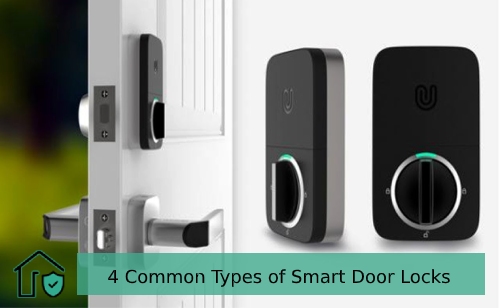
Smart locks replace the traditional lock cylinder — the part your key turns — with an electronic mechanism. You authenticate with a PIN, a smartphone app, Bluetooth proximity, or voice command. Most models still include a physical key slot as a backup, so a dead battery doesn't leave you stranded on your own doorstep.
The four main types you'll come across are smart deadbolts, Bluetooth entry locks, Wi-Fi and smart hub locks, and keypad combination locks. Each connects to your home differently and fits a different lifestyle. By the time you finish this guide, you'll know which type belongs on your door.
Contents
The 4 Types of Smart Door Locks Explained and Their Best Uses
Each type works differently under the hood. Knowing the difference lets you match the lock to your actual situation — not just grab whatever looks good on the shelf.
Smart Deadbolts
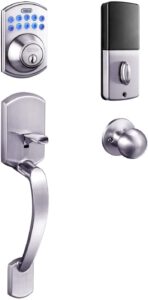
A smart deadbolt replaces your existing deadbolt with a motorized version. It's the most popular smart lock type for good reason. It fits the same door cutout your old lock used, maintains the physical security standard of a traditional deadbolt, and works with most existing doorframes without extra drilling.
- Fits most standard door cutouts — no new holes needed
- Runs on AA or AAA batteries with a typical lifespan of one to two years
- Available with or without an exterior keypad
- Wide compatibility with smart home platforms
- Keeps familiar exterior appearance — neighbors and visitors see a normal door
Smart deadbolts come in single-cylinder (key on one side) and double-cylinder (key on both sides) versions. Single-cylinder models are the smart lock standard. If you want to understand the underlying mechanism before upgrading, our guide to the 8 different types of deadbolts gives you a solid foundation to build on.
Bluetooth Entry Locks
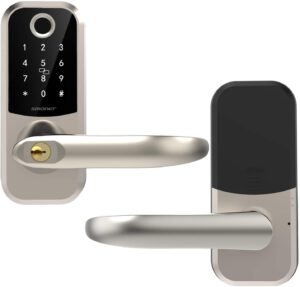
Bluetooth locks communicate directly with your phone — no Wi-Fi router required. When your phone comes within roughly 30 feet of the door, the lock can auto-unlock before you even reach it. No internet connection means fewer attack vectors, which is a genuine privacy and security benefit many people overlook.
- Great for cabins, garages, sheds, or anywhere without Wi-Fi
- Auto-unlock is convenient but depends on having a charged phone
- Cannot be controlled remotely unless paired with a separate bridge or hub
- Battery life is typically longer than Wi-Fi models
- Simple app interface — usually less setup than hub-based systems
Wi-Fi and Smart Home Hub Locks
Wi-Fi locks connect directly to your home network. You can lock and unlock from anywhere in the world through an app. They integrate with Amazon Alexa, Google Home, and Apple HomeKit, which means voice commands, routines, and automations — like locking all doors at 10 PM — become straightforward.
- Full remote access from any location with cell or internet service
- Activity logs show you who came and went, and exactly when
- Higher battery drain than Bluetooth-only models — expect more frequent changes
- Some models use Z-Wave or Zigbee protocols and require a compatible smart hub
- Best choice if you're building a full smart home setup
Keypad and Combination Locks
A keypad lock lets you — and anyone you give the code to — enter without a phone or app. Some standalone keypad models don't connect to any network at all. They're purely code-based and dead simple to operate.
- Easy to share temporary codes with guests, cleaners, or repair crews
- No app required — works for household members who aren't tech-savvy
- Many models combine keypad entry with Bluetooth or Wi-Fi for added flexibility
- Codes can be changed instantly if you think they've been shared too widely
- Backlit keypads work well in low-light conditions
Popular Smart Lock Brands That Deliver
Understanding the types is the foundation. Seeing how real brands execute those designs helps you shop with confidence rather than guessing from product photos.
August Smart Lock Pro
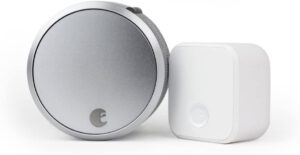
August is one of the most recognized names in residential smart locks. The August Smart Lock Pro installs on the interior side of your door — your existing exterior hardware stays completely unchanged. Visitors and potential intruders see nothing unusual from outside.
- Retrofit design: attaches over your existing deadbolt thumb-turn
- Includes the August Connect bridge for full remote access over Wi-Fi
- DoorSense technology detects whether the door is fully closed and latched
- Compatible with Apple HomeKit, Amazon Alexa, and Google Assistant
- Works with most standard single-cylinder deadbolts
For a curated list of top-performing options, our roundup of the 5 best smart deadbolt locks compares specs, price, and real-world performance side by side.
Google Home-Compatible Locks
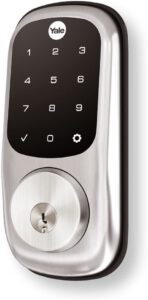
Google Home-compatible locks let you control your door through the Google Home app or with voice commands via Google Assistant. Brands like Yale, Schlage, and Kwikset all offer well-regarded models in this category.
- Yale Assure Lock 2: touchscreen keypad, app control, and voice command support
- Schlage Encode Plus: built-in Wi-Fi, no separate hub required, clean industrial design
- Kwikset Halo: straightforward setup, broad door compatibility, solid value
According to Wikipedia's overview of electronic locks, modern smart locks use a wide variety of authentication methods — from PIN codes to wireless radio protocols — making them among the most adaptable physical security tools available to homeowners today.
When a Smart Lock Makes Sense (and When It Doesn't)
Pro tip: If you regularly hand out spare keys to cleaners, dog walkers, or repair crews, a smart lock with temporary access codes eliminates the risk of unreturned keys entirely.
Best Scenarios for a Smart Lock
Smart locks aren't a universal upgrade. But they solve real problems in specific situations. Here's when making the switch genuinely pays off:
- You lose your keys often — remove the physical key from your routine entirely
- You rent a room or vacation property and need rotating guest access
- You want to let in a dog walker or cleaner while you're away without hiding a spare key
- You travel frequently and want to monitor door activity remotely
- You're building or expanding a connected smart home ecosystem
- You want to grant access to family members who keep forgetting their keys
Before you commit, it's worth understanding the security trade-offs honestly. Our detailed article on whether smart locks are safe covers both the genuine protections and the potential vulnerabilities you should know about.
When to Stick With a Traditional Lock
A smart lock isn't always the right answer. Be honest with yourself about these situations:
- Your home Wi-Fi is unreliable or you have no home network
- Your door has non-standard dimensions or cutouts that require heavy modification
- Older household members aren't comfortable with apps or keypads
- Your landlord prohibits alterations to door hardware
- You prefer no digital record of your entries and exits
- Your door doesn't close or latch consistently — a smart lock won't fix an alignment problem
Smart Lock Pricing: What to Expect at Every Budget
The price range for smart locks is genuinely wide. You can spend $30 on a basic keypad deadbolt or $300-plus on a flagship Wi-Fi model with full smart home integration. Here's a realistic breakdown by tier.
Entry-Level Options
Basic keypad locks and simple Bluetooth models land in this range. They cover the fundamentals without extras like remote app access or voice control. Good for rentals, secondary doors, or first-time buyers who want to test the concept.
Mid-Range and Premium Picks
These models add Wi-Fi connectivity, full app control, smart home integration, and activity logging. For most homeowners who want real functionality day to day, the mid-range tier hits the sweet spot between cost and capability.
| Price Range | Lock Type | Key Features | Best For |
|---|---|---|---|
| $30–$80 | Basic Keypad Deadbolt | PIN code entry, backup key slot | Budget buyers, rental units |
| $80–$150 | Bluetooth Smart Lock | App unlock, auto-unlock, guest codes | Tech-comfortable homeowners, privacy-focused buyers |
| $150–$250 | Wi-Fi Smart Deadbolt | Remote access, voice control, activity log | Smart home users, frequent travelers |
| $250–$350+ | Premium Hub Lock | Full ecosystem integration, fingerprint option, video linkage | High-security households, multi-property owners |
Watch out: Some locks advertised as "Wi-Fi compatible" actually require a separate hub sold for an additional $50–$80 — check the box carefully before you buy.
Also factor in ongoing costs. Wi-Fi locks drain batteries significantly faster than Bluetooth-only models. If battery replacements happen every three to four months instead of once a year, that difference adds up over time.
Keeping Your Smart Lock in Top Shape
A smart lock is essentially a small computer mounted on your door. Like any electronic device, it needs occasional attention to stay reliable over the long term.
Routine Maintenance Tasks
- Replace batteries proactively — most apps send low-battery alerts; act on them before the lock goes dead
- Clean the keypad surface with a dry microfiber cloth — avoid harsh cleaners that can degrade the finish
- Lubricate the bolt mechanism twice a year using graphite powder or a dry PTFE lubricant (avoid WD-40, which attracts dust)
- Apply firmware updates through the manufacturer's app when prompted — these often include security patches
- Test your backup key entry at least once every few months to confirm it still works
- Audit your guest access codes periodically — remove codes for people who no longer need regular access
Common Problems and How to Fix Them
- Lock won't respond to the app: check your Wi-Fi connection first, then restart the lock by removing and reinserting the batteries
- Bolt sticks or doesn't fully extend: usually a door alignment issue — inspect the strike plate and adjust if needed
- Keypad is unresponsive or sluggish: wipe clean with a dry cloth and check battery contacts for corrosion
- Auto-unlock triggers too early or fails to trigger: recalibrate the geofence radius in the app settings
- Lock makes grinding noises during operation: the bolt may need lubrication or the door may have shifted seasonally
If your existing hardware feels loose or the mechanism shows wear, it's worth understanding how smart locks work mechanically before diagnosing further — sometimes what looks like a lock problem is actually a door frame issue.
What You Need to Install a Smart Lock
Most smart locks are designed for DIY installation. If you're comfortable with a screwdriver, you can almost certainly install one yourself in under 30 minutes. That said, being prepared before you start makes the whole process much smoother.
Tools You'll Need
- Phillips-head screwdriver — covers the majority of smart lock installs
- Flathead screwdriver — useful for prying off cover plates on some models
- Tape measure — to verify your door thickness (most smart locks support 1⅜" to 2" doors)
- Drill with hole saw attachment — only needed if cutting a new hole; most retrofits skip this entirely
- Fresh batteries — check what your specific model requires before you begin
Door Prep Checklist
Run through these checks before you touch the packaging. Catching a mismatch early saves a return trip to the hardware store.
- Measure your door thickness — confirm it falls within the lock's supported range
- Check the backset (distance from door edge to hole center) — standard sizes are 2⅜" or 2¾"
- Confirm the door closes and latches smoothly — misaligned doors cause smart locks to jam or misread the bolt position
- Remove the old lock completely and clean the mounting area before installing
- Download the lock's companion app before starting so you can complete Bluetooth or Wi-Fi pairing immediately after install
For a step-by-step walkthrough of swapping out existing hardware, our guide on how to replace a front door lock covers the full process clearly. If you're working with a new handle set at the same time, our door handle installation guide walks through door prep from scratch.
Frequently Asked Questions
Can smart locks be hacked?
It's possible in theory, but the practical risk for most homes is low. Wi-Fi locks carry slightly more exposure than Bluetooth-only models. Keep firmware updated, use strong unique PINs, and choose brands with a solid security track record. Our full breakdown of smart lock safety goes deeper on this topic.
Do smart locks work when the power goes out?
Yes — smart locks run on their own batteries, not your home's power supply. A power outage won't affect them. The only exception is a hardwired model, which is rare in residential use. Battery-powered locks also typically include a 9V battery emergency terminal on the exterior if the internal batteries die completely.
Will a smart lock fit my existing door?
Most smart deadbolts are designed to replace standard single-cylinder deadbolts and fit existing door prep with no modifications. Measure your door thickness and backset first. Doors outside the standard range — very thick or unusually thin — may need a specialty model or adapter kit.
The best smart lock isn't the most expensive one — it's the one that fits how you actually live in your home.


About Vincent Foster
Greetings, This is Tom Vincent. I’m a home Security Expert and Web developer. I am a fan of technology, home security, entrepreneurship, and DIY. I’m also interested in web development and gardening. I always try to share my experience with my reader. Stay Connected and Keep Reading My Blog. Follow Me: Facebook, Twitter, Pinterest
Now you can get FREE Gifts. Or latest Free Security Cameras here.
Disable Ad block to reveal all the gifts. Once done, hit a button below