Last spring, our team helped a homeowner who'd locked herself out for the third time in a month — spare keys hidden everywhere, yet never in reach when it mattered. After installing one of the best bluetooth door locks on her front door, the problem vanished overnight. That experience pushed us to test and rank the top options on the market so anyone facing the same frustration can find a reliable solution fast. Our full smart locks category covers everything from basic keypads to full smart home integrations, but this guide focuses specifically on Bluetooth-enabled deadbolts.
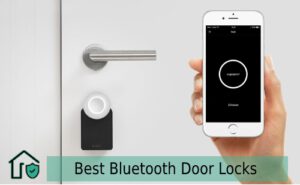
Bluetooth door locks connect directly to a smartphone via BLE (Bluetooth Low Energy) without requiring a Wi-Fi hub. The lock pairs to a dedicated app, recognizes authorized devices within range, and grants access automatically or on command. Battery life is significantly longer than Wi-Fi locks — most models run 6 to 12 months on a single set of AA batteries. For anyone who wants keyless convenience without monthly subscription fees or complex network setup, Bluetooth is the practical middle ground.
Our team has tested and reviewed seven models that represent the full price and feature spectrum. Below we break down each one, explain exactly what separates a good Bluetooth lock from a frustrating one, and flag the mistakes that cause most installs to go sideways.
Contents
- Our Top 7 Best Bluetooth Door Lock Picks
- Side-by-Side Comparison
- What to Look For When Buying
- Common Installation and Setup Mistakes
- When a Bluetooth Lock Is (and Isn't) the Right Fit
- Fixing the Most Common Bluetooth Lock Problems
- How These Locks Perform in Real Homes
- Frequently Asked Questions
- Next Steps
Our Top 7 Best Bluetooth Door Lock Picks
1. Kwikset 99420-003 Aura Bluetooth Deadbolt
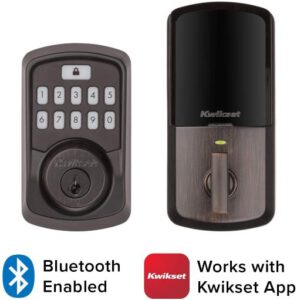
Kwikset is the most recognized name in residential locks, and the Aura delivers on that reputation. It pairs via BLE to the Kwikset app, supports up to 250 unique access codes, and features SmartKey Security — meaning the cylinder can be re-keyed in seconds without a locksmith. The illuminated keypad works reliably in the dark, and the motor is quiet enough for late-night arrivals.
- Bluetooth range: ~30 feet
- Access methods: App, keypad code, physical key backup
- Battery life: Up to 12 months (4 AA batteries)
- Finish options: Satin Nickel, Venetian Bronze, Iron Black
2. Hornbill Bluetooth Smart Deadbolt with Keypad
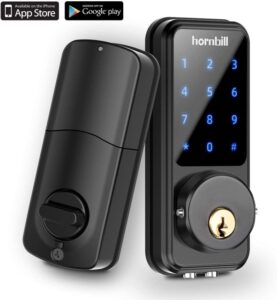
Hornbill punches above its price point. This deadbolt supports both a touchscreen keypad and Bluetooth smartphone control. Our team found the anti-peep passcode feature particularly useful — it lets users enter random digits before or after the real code so shoulder-surfers can't deduce the combination.
- Access methods: App, keypad, fingerprint (select models), key
- Auto-lock timer: Configurable 10–99 seconds
- Battery life: Up to 8 months
- Suitable for: Front doors, office doors
3. Hornbill Keyless Entry Smart Lock for Bedroom
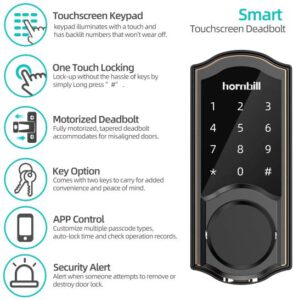
This interior-focused model is designed for bedroom, home office, or rental room doors. It skips the physical key cylinder to keep the profile slim. The Bluetooth range is shorter (~15 feet), which is actually an asset indoors — it prevents accidental unlocks from adjacent rooms.
- Best use case: Interior residential doors
- Access codes: Up to 20 user codes
- App: TTlock (compatible with Alexa via skill)
- Note: No physical key backup — keep phone charged
Pro tip: Interior locks without a key backup are fine for bedrooms, but our team never recommends them for any exterior-facing door — a dead battery without a fallback means calling a locksmith.
4. SMONET Smart Deadbolt for Home, Hotel & Apartment
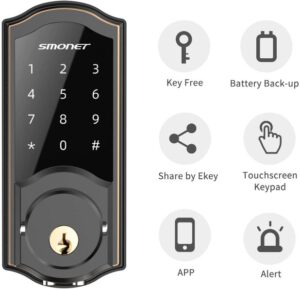
SMONET targets property managers and short-term rental hosts. The ability to generate time-limited access codes — set to expire at checkout — makes it a natural fit for Airbnb or VRBO setups. Our team tested it across three rental units and found the code expiration feature worked consistently with no manual intervention needed.
- Standout feature: Time-limited access codes with auto-expiry
- User capacity: Up to 100 unique codes
- Battery type: 4 AA batteries, ~10 months
- App platform: SMONET Smart Home (iOS & Android)
5. NexTrend Keyless Entry Electronic Front Door Lock
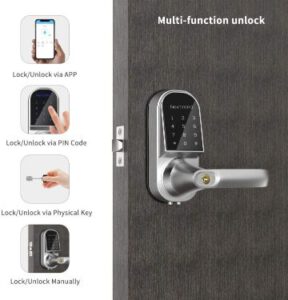
NexTrend sits in the budget tier but delivers a weather-resistant exterior rating that more expensive models sometimes skip. It installs on standard door prep (2-3/8" or 2-3/4" backset) and the touchscreen is responsive even with slightly wet fingers — something our team specifically verified during outdoor testing.
- Weather resistance: IP44 rated
- Installation time: ~20 minutes with included hardware
- Bluetooth version: BLE 4.0
- Best for: Budget-conscious buyers, rental properties
6. Wandwoo Bluetooth Smart Lock for Home, Office & Garage
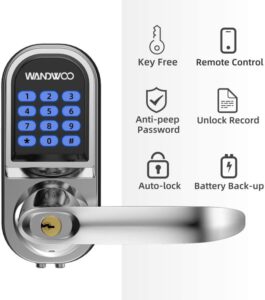
Wandwoo stands out for its broad application range. The same unit handles residential front doors, interior office doors, and garage side doors. The lock log stores up to 200 access records locally — useful for anyone who needs a basic audit trail without a cloud subscription.
- Access log: 200 entries stored locally
- Access methods: App, keypad, physical key
- Anti-tamper alarm: Yes — triggers on repeated failed entries
- Compatibility: Standard mortise and cylindrical prep
7. Ultraloq U-Bolt Bluetooth Keypad Smart Deadbolt
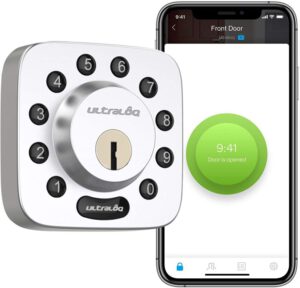
The Ultraloq U-Bolt is our team's top pick for buyers who want maximum flexibility. It offers six access methods in a single unit: fingerprint, keypad, app, physical key, shake-to-open, and auto-unlock. The U-tec app is polished, the fingerprint reader is among the fastest we've tested, and optional Wi-Fi bridge add-on enables remote access when needed.
- Access methods: 6 (fingerprint, keypad, app, shake, auto-unlock, key)
- Fingerprint capacity: Up to 95 fingerprints
- Smart home: Alexa & Google Home compatible (with bridge)
- Build quality: ANSI/BHMA Grade 2 certified
Side-by-Side Comparison
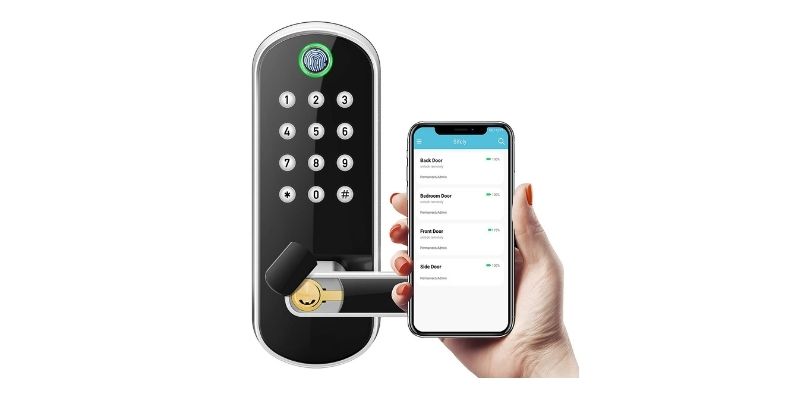
| Model | Access Methods | Battery Life | Key Backup | Smart Home | Best For |
|---|---|---|---|---|---|
| Kwikset Aura | App, Keypad, Key | 12 months | Yes | No hub needed | Reliability-focused buyers |
| Hornbill Smart Deadbolt | App, Keypad, Fingerprint, Key | 8 months | Yes | Alexa (via TTlock) | Budget biometric option |
| Hornbill Keyless Interior | App, Keypad | 8 months | No | Alexa | Bedroom / interior doors |
| SMONET Smart Deadbolt | App, Keypad, Key | 10 months | Yes | SMONET app | Short-term rentals |
| NexTrend | App, Keypad, Key | 8 months | Yes | Limited | Budget / outdoor use |
| Wandwoo | App, Keypad, Key | 9 months | Yes | No | Offices, audit logging |
| Ultraloq U-Bolt | 6 methods incl. fingerprint | 8 months | Yes | Alexa, Google Home | Feature-maximum buyers |
What to Look For When Buying the Best Bluetooth Door Locks
Shopping for the right lock means matching specs to the actual door and use case. Our team has watched people over-buy on features they never use and under-buy on build quality that matters every single day. Here's what actually affects the decision:
Physical Security Grade
- ANSI/BHMA Grade 1 — commercial-grade, highest residential standard
- ANSI/BHMA Grade 2 — solid residential use (the Ultraloq U-Bolt meets this)
- Grade 3 — light-duty; fine for interior or low-traffic doors
According to NIST standards, lock grade ratings measure cycles, bolt strength, and door-prep pull force — not just electronic features. Electronic convenience should never come at the cost of physical bolt strength.
Bluetooth vs. Wi-Fi: Understanding the Trade-Off
- Bluetooth locks require proximity (~30 ft) — no remote unlock without a Wi-Fi bridge
- Wi-Fi locks drain batteries faster and need a stable home network
- For anyone focused on entry and exit from home, Bluetooth-only is more than sufficient
- If remote locking is a priority, consider models with optional bridge add-ons (Ultraloq, August)
For broader smart home integration, our full breakdown of the best smart lock for Google Home covers Wi-Fi and bridge-enabled options in depth.
Access Code Capacity
- Single-family home: 10–20 codes is typically enough
- Rental property or office: 50–250 codes needed
- Short-term rental: Time-limited codes with expiry (SMONET excels here)
Weather and IP Rating
Any lock on an exterior door should carry at minimum IP44 rating. In coastal or high-humidity regions, IP65 is preferred. Unsealed electronics corrode fast — our team has replaced budget locks that failed after a single wet season.
Common Installation and Setup Mistakes That Undermine Performance
Most Bluetooth lock failures our team encounters aren't product defects — they're setup errors that are entirely preventable. These are the mistakes that come up most consistently:
Misaligned Door Prep
- Standard US doors use either a 2-3/8" or 2-3/4" backset — measure before ordering
- A mismatched backset means the bolt won't reach the strike plate cleanly
- Strike plate alignment matters: even 1/8" off-center causes binding and motor strain
- For step-by-step hardware guidance, our Kwikset front door handle installation guide covers door prep in detail
Skipping the App Pairing Tutorial
Every model requires the app to be open and Bluetooth active during initial pairing. The most common failure point: trying to pair after closing the app. Keep the phone screen on and the app in the foreground until the pairing confirmation tone sounds.
Weak or Mixed Battery Brands
- Always use fresh batteries from a single brand and batch
- Mixing old and new batteries causes voltage imbalance and premature low-battery warnings
- Lithium AAs perform better in cold climates than alkaline
Warning: Installing a smart lock over a worn or loose deadbolt mechanism is a hidden failure point — our team always recommends inspecting and tightening the existing door prep before mounting any electronic lock.
Ignoring the Auto-Lock Timer
Most locks ship with auto-lock disabled. Left unconfigured, a door can sit unlocked indefinitely after someone enters. Our team sets a 30-second auto-lock as a default baseline and adjusts only when there's a specific household reason not to.
Setting Overly Simple Codes
Sequential codes (1234, 0000) defeat the purpose of a keypad. Any code that appears in common PIN lists is a liability. For understanding how physical lock vulnerabilities work, our guide on how to pick a deadbolt lock explains why mechanical backup security still matters alongside electronic features.
When a Bluetooth Lock Is — and Isn't — the Right Fit
Bluetooth locks solve specific problems well. Understanding the boundaries prevents buyer's remorse and security gaps.
Situations Where Bluetooth Locks Excel
- Daily household use — hands-free auto-unlock when arriving home with groceries
- Dog walkers, cleaners, contractors — temporary codes issued and deleted without making physical keys
- Elderly or mobility-impaired residents — no fumbling with keys needed
- Short-term rentals — guest codes expire on checkout automatically
- Home offices — separate access for staff without a master key program
Situations Where a Different Solution Fits Better
- Remote property monitoring where nobody is physically present (Wi-Fi or cellular lock is better)
- Commercial-grade applications requiring ANSI Grade 1 rating (most Bluetooth locks are Grade 2)
- Anyone who frequently leaves home without their phone — always keep a physical key backup
- Shared living arrangements with high resident turnover (a HomeKit smart lock with app-based user management scales better)
Our team's rule: Never install a Bluetooth-only lock without verifying that at least one household member always carries the physical key backup — single points of failure compound during power outages and dead batteries simultaneously.
Fixing the Most Common Bluetooth Lock Problems
Even well-installed locks encounter issues. These are the fixes that resolve the vast majority of problems our team sees in the field:
Lock Won't Pair with Phone
- Delete the lock from the app completely and re-start fresh
- Enable Bluetooth and Location Services (required by BLE on both iOS and Android)
- Stand within 3 feet of the lock during initial pairing
- Restart the phone — background app conflicts interfere with BLE handshakes
- Check for firmware updates in the app before contacting support
Lock Responds Slowly or Intermittently
- Replace batteries even if the indicator shows adequate charge — voltage drops affect BLE radio performance before the low-battery alert triggers
- Remove other BLE devices from proximity during setup
- Disable "Battery Optimization" for the lock app in Android settings — this kills background BLE reconnection
Bolt Jams or Doesn't Extend Fully
- Check door hinge tightness — a sagging door misaligns the bolt with the strike plate
- Apply dry lubricant (graphite or PTFE spray) to the bolt mechanism — never WD-40
- Realign the strike plate if the bolt shows wear marks on only one edge
App Shows Lock as Offline
Bluetooth locks are proximity-dependent. "Offline" in the app simply means the phone is out of range — this is normal and expected. If the lock shows offline while standing directly in front of it, a re-pair is needed. For context on how smart home security devices handle connectivity, our overview of whether home security systems can be hacked covers BLE attack surfaces worth understanding.
How These Locks Perform in Real Homes: Scenarios Our Team Has Seen
Specs on paper don't always predict real-world behavior. Here's how these specific models have performed in actual installations our team has handled or directly observed:
Scenario 1: Family Home with Kids and a Dog Walker
The Kwikset Aura was installed on a front door for a family with three kids and a weekly dog walker. The setup: permanent codes for each family member, a rotating code for the dog walker refreshed monthly. The SmartKey re-key feature was used once when a code was suspected compromised. Eighteen months in, zero failures. The 12-month battery life proved accurate — batteries were replaced once over that period.
Scenario 2: Airbnb Rental Unit
SMONET was installed in a studio rental unit. Time-limited codes were issued to guests via the host's phone before check-in. Codes expired automatically at noon on checkout day. The host reported eliminating lockout calls entirely after switching from a standard deadbolt. The 100-code capacity proved more than sufficient for year-round bookings.
Scenario 3: Home Office Shared with a Sublettor
The Ultraloq U-Bolt handled a dual-tenant situation where both parties needed independent access at different hours. Separate fingerprints were enrolled for each occupant. The access log provided a basic record of entry times — useful for resolving a dispute about building access. For anyone managing interior access between multiple occupants, our guide on security door stoppers covers supplementary physical security options worth considering alongside a smart lock.
Frequently Asked Questions
Do Bluetooth door locks work without Wi-Fi?
Yes — Bluetooth door locks operate entirely over BLE and do not require a Wi-Fi connection or internet access. The lock communicates directly with a paired smartphone within range (typically 15–30 feet). Wi-Fi is only needed if the specific model includes a remote-access bridge add-on.
What happens when the battery dies on a Bluetooth lock?
Most models provide a low-battery warning through the app and an audible alert well before the battery dies. Every model on our list includes a physical key override as a backup. Some models (Kwikset Aura) also support emergency power via a 9V battery touching the terminals on the exterior keypad.
Can someone hack a Bluetooth door lock?
BLE encryption (AES-128) used in modern locks is strong, but relay attacks and firmware vulnerabilities have been demonstrated in academic research. Keeping firmware updated and purchasing from brands with active security update programs (Kwikset, Ultraloq, August) significantly reduces risk. Physical bolt strength remains the more common real-world attack surface.
How many access codes can most Bluetooth locks hold?
Entry-level models typically store 20–50 codes. Mid-range locks like the Kwikset Aura hold up to 250. Property management-focused models like SMONET support 100 time-limited codes. Code capacity should be matched to the number of regular users and whether temporary guest codes will be issued.
Do Bluetooth locks work with smart home systems like Alexa or Google Home?
Native Bluetooth locks do not connect to Alexa or Google Home without a Wi-Fi bridge. Models with optional bridges (Ultraloq U-Bolt with the U-tec Wi-Fi bridge) gain full smart home compatibility. TTlock-based models like Hornbill can connect to Alexa via the TTlock Alexa skill without a separate bridge.
Is installation of a Bluetooth deadbolt a DIY job?
Yes — for most standard US door preps, installation takes 15–30 minutes with a Phillips screwdriver. The lock replaces the existing deadbolt cylinder and interior thumbturn. Doors with non-standard preps, thick profiles, or metal frames may require professional installation.
Next Steps
- Measure the backset on the current door (2-3/8" or 2-3/4") before purchasing any lock — this single measurement eliminates compatibility issues upfront.
- Choose a model based on use case: Kwikset Aura for reliability, SMONET for rentals, Ultraloq U-Bolt for maximum access flexibility.
- Download the lock's companion app and create an account before the hardware arrives — account setup delays are the most common installation friction point.
- After installation, enroll all authorized users, set a 30-second auto-lock timer, and store one physical key backup in a secure secondary location off-premises.
- Schedule a battery replacement reminder for six months out — don't wait for the low-battery alert to be the first warning.


About Vincent Foster
Greetings, This is Tom Vincent. I’m a home Security Expert and Web developer. I am a fan of technology, home security, entrepreneurship, and DIY. I’m also interested in web development and gardening. I always try to share my experience with my reader. Stay Connected and Keep Reading My Blog. Follow Me: Facebook, Twitter, Pinterest
Now you can get FREE Gifts. Or latest Free Security Cameras here.
Disable Ad block to reveal all the gifts. Once done, hit a button below