Is the convenience of keyless entry really worth the security trade-off? If you've been asking yourself are smart locks safe enough to replace a traditional deadbolt, the answer is a clear yes — but only when you choose the right model and configure it correctly. Smart locks introduce digital vulnerabilities that traditional deadbolts simply don't have, and that distinction matters when you're protecting your home. This guide breaks down the real risks, the common mistakes, and exactly what to look for before you invest in one from our smart lock reviews collection.
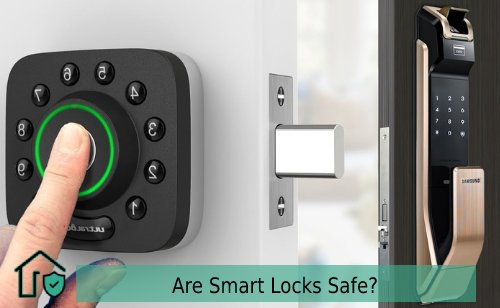
Smart locks have gone from novelty gadgets to mainstream home security tools. Bluetooth, Z-Wave, Zigbee, and Wi-Fi models now fill the shelves at every major retailer. You can control access from across the country, set temporary PINs for houseguests, and receive instant notifications every time your door opens. The convenience is real. But so are the vulnerabilities — if you ignore the fundamentals of digital security.
Here's what most buyers don't realize: the majority of smart lock security failures aren't caused by sophisticated hacking. They result from predictable oversights — factory PINs left unchanged, outdated firmware, and weak network passwords. The threat model is entirely manageable once you understand it.
Contents
- Are Smart Locks Safe? What the Evidence Actually Shows
- Security Mistakes That Leave Your Smart Lock Exposed
- How to Set Up Your Smart Lock Securely Step by Step
- Routine Maintenance That Keeps Your Smart Lock Reliable
- Beginner-Friendly vs. Advanced Smart Lock Features
- Best Practices Every Smart Lock Owner Should Follow
- Tools and Gear You Need Before Installing a Smart Lock
- Frequently Asked Questions
Are Smart Locks Safe? What the Evidence Actually Shows
Digital vs. Physical Attack Surfaces
Traditional deadbolts have one attack surface: the physical lock. A burglar needs to pick it, bump it, or kick the door in. Smart locks add a digital layer — and with it, potential entry points like Bluetooth sniffing, relay attacks, and cloud account compromise. That sounds alarming. In practice, physical attacks remain far more common than digital ones by a wide margin.
According to FBI crime statistics, the overwhelming majority of home break-ins involve forced entry through doors or windows — not remote exploitation of smart lock firmware. A well-rated smart lock from a reputable brand, properly installed on a solid-core door with a reinforced strike plate, is not a weak point in your security perimeter.
Encryption and Authentication Standards
The best smart locks use AES-128 or AES-256 encryption for all wireless communication. Brands like Schlage, Yale, and August publish their security architecture openly. When comparing models, look for these non-negotiable features:
- 128-bit or 256-bit AES encryption on all wireless signals
- Two-factor authentication (2FA) on the companion app
- ANSI/BHMA Grade 1 physical durability rating
- A verifiable firmware update history from the manufacturer
If a brand doesn't publish its encryption standard or hasn't pushed a firmware update in over a year, that's a red flag. For a deeper look at how the technology functions under the hood, the guide on how smart locks work is a solid starting point before you commit to a purchase.
Security Mistakes That Leave Your Smart Lock Exposed
Weak PINs and Shared Credentials
The single most common smart lock security failure isn't a sophisticated exploit — it's a predictable PIN. Codes like 1234, 0000, or your birth year are the first combinations any opportunistic intruder will try. Never use personally identifiable numbers as your access code. Use a random six- to eight-digit sequence you don't associate with anything in your life.
The same rule applies to your app account. Using a recycled password from email or social media puts your lock at risk the moment any of those accounts are compromised. Use a password manager and generate a unique, randomized credential for your smart lock account specifically.
Unsecured Network Connections
Wi-Fi-enabled smart locks inherit the security posture of the network they connect to. If your router runs outdated firmware, uses WEP encryption, or still has the default admin password active, your lock is only as secure as the weakest link in that chain.
Pro tip: Put your smart lock on a dedicated IoT network segment so a compromised laptop or smart TV on your main network can't reach your lock's credentials.
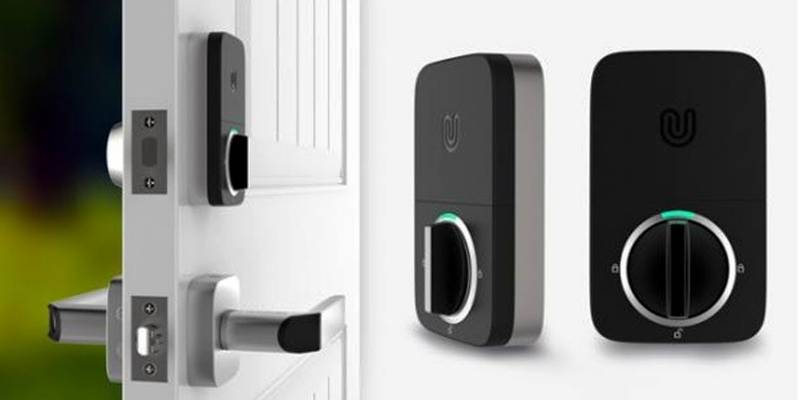
Bluetooth-only locks eliminate the cloud dependency entirely but introduce relay attacks, where an attacker amplifies your phone's signal to trick the lock into thinking you're standing at the door. Most modern Bluetooth locks counter this with proximity detection and challenge-response authentication — confirm the specific model you're considering uses both before buying.
How to Set Up Your Smart Lock Securely Step by Step
Initial Configuration Checklist
Most smart lock security problems are baked in during setup and never corrected. Before you rely on your new lock to protect your home, work through this checklist in order:
- Change the master PIN immediately — never leave the factory default active even for a single day.
- Create your app account with a unique, strong password and enable two-factor authentication before pairing.
- Register the lock's serial number with the manufacturer so you receive security bulletins and recall notices.
- Check for a firmware update before completing the pairing — many locks ship with outdated software.
- Set an auto-lock timer. Most models allow intervals between one and thirty minutes; five to ten minutes is a practical default.
- Configure activity alerts so you receive a push notification for every lock and unlock event.
Test the auto-lock feature from outside the door — with your phone in hand — before you close it for the first time. Confirming the lock cycles correctly before you're on the wrong side of it prevents an embarrassing lockout. If you're replacing an existing deadbolt, the step-by-step guide on how to replace a front door lock covers the physical installation before you reach the digital configuration stage.
Securing the Network Connection
For Wi-Fi or hub-connected locks, these network steps are non-negotiable before you go live:
- Use WPA3 or WPA2 encryption on your router — WEP is completely compromised and must not be used.
- Change your router's default admin username and password to something unique.
- Enable automatic router firmware updates or schedule a monthly manual check.
- Consider placing all smart home devices on a dedicated guest or IoT network segment.
Routine Maintenance That Keeps Your Smart Lock Reliable
Firmware and App Updates
Firmware updates aren't optional upkeep — they're how manufacturers patch documented security vulnerabilities. Enable automatic firmware updates whenever your lock supports it. If auto-updates aren't available, set a monthly calendar reminder to open the manufacturer's app and check for new releases manually.
The companion app requires the same discipline. An outdated app can expose your authentication tokens and cloud communication to known exploits even when the lock's own firmware is fully current. Update both together on the same schedule.
Battery and Hardware Checks
A smart lock depleted by a dead battery defaults to whatever failsafe the manufacturer programmed — which in some cases means unlocking the door entirely. Most models issue low-battery warnings at 20% and again at 10% capacity. Don't ignore those alerts. Keep a set of spare batteries in a drawer near the door.
Beyond the battery, run through this physical inspection every six months:
- Test the bolt's throw — it should extend and retract fully without drag or resistance.
- Check that strike plate screws reach the door frame stud, not just the jamb material.
- Inspect the deadbolt face for any signs of drilling, picking attempts, or tampering.
- Verify the door's alignment hasn't shifted seasonally, since a warped frame puts stress on the bolt mechanism over time.
Beginner-Friendly vs. Advanced Smart Lock Features
What to Look for as a First-Time Buyer
If this is your first smart lock, resist the urge to buy the most feature-rich model on the market. Start with the fundamentals and get them right. For first-time buyers, prioritize these attributes above everything else:
- ANSI/BHMA Grade 1 or Grade 2 physical durability rating
- Simple keypad or fingerprint entry with a physical key cylinder as backup
- A well-reviewed companion app with active developer support and recent updates
- Battery life rated for at least six months under normal residential use
You can find solid options across every price range in the roundup of the best smart deadbolt locks, which evaluates models by security certification, connectivity type, and ease of installation for first-time buyers.
Advanced Features Worth the Upgrade
Once you're comfortable managing the basics, these capabilities add genuine security value and are worth paying for:
| Feature | What It Does | Security Benefit |
|---|---|---|
| Geofencing auto-lock | Locks automatically when your phone leaves a set radius | Eliminates forgotten-to-lock incidents entirely |
| Time-limited access codes | Guest codes expire after a defined window | Prevents stale codes from being reused by former visitors |
| Full access log with alerts | Logs every event and sends push notifications in real time | Immediate detection of unauthorized access attempts |
| Tamper alarm | Triggers an audible alert if the lock body is struck or forced | Deters physical attack and alerts nearby occupants |
| Biometric fingerprint reader | Authenticates via enrolled fingerprints only | Eliminates PIN theft and shoulder-surfing entirely |
Best Practices Every Smart Lock Owner Should Follow
Managing User Access
Treat digital access codes exactly like physical keys — issue them deliberately and revoke them the moment they're no longer needed. The ability to grant and revoke access remotely is one of the clearest security advantages smart locks hold over traditional deadbolts. Most platforms support granular access levels, letting you assign time-restricted or read-only permissions to specific users rather than handing everyone full admin control.
Establish a simple household access policy and enforce it consistently:
- Every regular user gets their own unique PIN — never share a single code between multiple people.
- All guest codes are time-limited; set them to expire automatically the day after the visit ends.
- Service providers such as cleaners or contractors receive single-day codes that self-delete.
- Audit your full access list every three months and delete any credentials that are no longer active.
Backup Access Methods
Every smart lock should have at least one backup access method — ideally a physical key cylinder. Technology fails. Batteries die. Apps go offline during server outages. A physical key stored in a quality-rated lockbox nearby is a practical contingency, not a security weakness, as long as the lockbox itself uses a strong combination and is properly concealed.
Physical door security matters just as much as the lock mechanism itself. A smart lock mounted on a hollow-core door with short jamb screws is still a weak point regardless of how advanced the electronics are. Use three-inch screws on your strike plate to anchor directly into the door frame stud, and consider a door reinforcement kit if the frame itself is lightweight.
Tools and Gear You Need Before Installing a Smart Lock
Installation Essentials
Most smart locks are engineered for straightforward DIY installation. You likely already own everything you need. Before you start, confirm you have:
- Phillips and flathead screwdrivers — a power drill set to low torque speeds up the process significantly
- A measuring tape to confirm your door's thickness (most smart locks fit doors between 1⅜″ and 1¾″)
- A 2⅛″ hole saw if you're installing on a door that doesn't have an existing bore hole
- Fresh lithium AA or AAA batteries matching your lock's specification — alkaline cells underperform in cold climates and drain faster under frequent use
Door and Lock Compatibility
Not every door is smart-lock-ready without minor adjustments. Confirm these compatibility points before you purchase a specific model:
- Backset: The distance from the door edge to the center of the bore hole — standard sizes are 2⅜″ and 2¾″. Confirm which your door uses.
- Door thickness: Most smart locks accommodate 1⅜″ to 1¾″ standard residential doors. Metal or commercial-grade doors may need an adapter plate.
- Existing deadbolt tailpiece: Many smart locks retrofit directly onto your existing deadbolt's tailpiece, meaning no new bore hole is needed. Check the compatibility list for your current hardware brand.
- Hub requirements: Z-Wave and Zigbee locks require a compatible smart home hub. Wi-Fi and Bluetooth locks connect directly to your phone without additional hardware.
Frequently Asked Questions
Can smart locks be hacked remotely?
Technically yes, but practically it's rare. Well-engineered smart locks use AES-128 or AES-256 encryption, and executing a remote exploit requires significant technical skill plus specific knowledge of your hardware and network. The far more common attack vectors are weak PINs and compromised app accounts — both entirely within your control to prevent.
Do smart locks work during a power outage?
Smart locks run on battery power, not household current, so a power outage has no direct effect on the lock itself. What can fail is cloud connectivity for remotely operated Wi-Fi locks. A physical key cylinder or battery-backed keypad gives you reliable access regardless of internet or grid status.
Are smart locks as physically strong as traditional deadbolts?
Physical strength is determined by the lock's ANSI/BHMA grade rating, not its connectivity. A Grade 1 smart deadbolt is equally resistant to forced entry as a Grade 1 keyed deadbolt. The electronic components add a digital attack surface but do not weaken the mechanical bolt or the door-frame interface.
What happens when a smart lock battery dies completely?
Most smart locks issue low-battery warnings at 20% and 10% capacity well before a complete drain. When the battery does die, many models allow a temporary power boost via a 9-volt battery held against external contacts, giving you enough power to enter your PIN and unlock the door. Always keep spare batteries on hand and respond to low-battery alerts immediately.
A smart lock is only as secure as the habits of the person using it — buy the right hardware, configure it correctly from day one, and stay on top of updates.


About Vincent Foster
Greetings, This is Tom Vincent. I’m a home Security Expert and Web developer. I am a fan of technology, home security, entrepreneurship, and DIY. I’m also interested in web development and gardening. I always try to share my experience with my reader. Stay Connected and Keep Reading My Blog. Follow Me: Facebook, Twitter, Pinterest
Now you can get FREE Gifts. Or latest Free Security Cameras here.
Disable Ad block to reveal all the gifts. Once done, hit a button below